
I spent weeks testing these wireless adapters in my daily drive because dealing with cables every time I hopped in the car was driving me crazy.
If you’re tired of plugging in your phone for CarPlay or Android Auto, this comparison breaks down Ottocast and AAWireless based on real-world use. I cover everything from connection speed and reliability to battery impact and which one fits your needs better.
By the end, you’ll know exactly which adapter makes your drives smoother.
| Feature | Ottocast | AAWireless |
| Dual CarPlay & Android Auto Support | Yes, strong in most models | Yes, excellent switching |
| Connection Speed | Fast, often under 20 seconds | Very quick, reliable auto-connect |
| Build Quality | Compact plastic, lightweight | Premium metal housing |
| Multi-User Experience | Good, some models support multiples | Outstanding with button switch |
| Battery Drain | Noticeable on phone in some tests | Generally lower impact |
| OTA Updates | Available | Strong regular updates |
| Compatibility | 600+ vehicles, some exceptions | Broad, Android-focused roots |
| Price Range | Often budget-friendly | Slightly premium |
| Reliability | Solid for regular use | Highly praised for consistency |
Key Differences Between The Ottocast And Aawireless
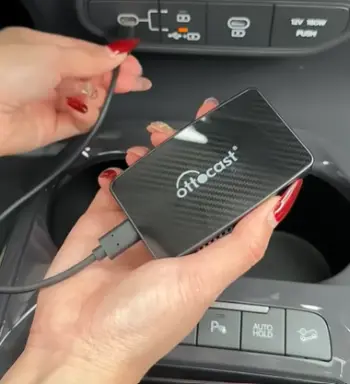
Form Factor and Design: Ottocast adapters like the Mini or Pico are super tiny and blend right into your console without drawing attention.
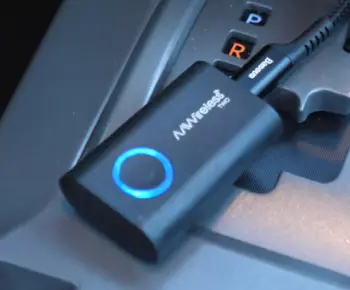
AAWireless feels more premium with its metal build that gives a solid, durable impression right out of the box.
Ecosystem Focus: Ottocast handles both Apple and Android users seamlessly in many setups.
AAWireless started strong with Android Auto and expanded beautifully to CarPlay, making device switching effortless.
Setup Simplicity: Both plug in easily, but Ottocast often feels more plug-and-play for mixed households.
AAWireless shines with its dedicated app for tweaks and updates.
Connection Stability: AAWireless edges out in long-term consistency during highway drives.
Ottocast performs great but can occasionally need a reset in tricky vehicle setups.
Extra Features: AAWireless offers better multi-phone handling with physical button switches.
Ottocast models sometimes include unique touches like sharper audio codecs in certain variants.
Key Features Of Ottocast
- Ultra-Compact Size: These dongles disappear into your USB port, keeping your dash clean and clutter-free.
- Dual Platform Support: Effortlessly turns wired CarPlay or Android Auto into wireless for iPhone and Android phones.
- Fast Boot Times: Usually ready in 15-25 seconds after starting the car, so you get maps and music quickly.
- Wi-Fi 5GHz Focus: Delivers clearer audio with less interference compared to older Bluetooth-only solutions.
- Broad Vehicle Compatibility: Works with hundreds of models from 2016 onward, though check for specific exclusions like certain aftermarket units.
- OTA Firmware Updates: Keeps the device improving over time without manual hassle.
- Easy Multi-Device Pairing: Handles switching between family members’ phones reasonably well.
Pros Of Ottocast
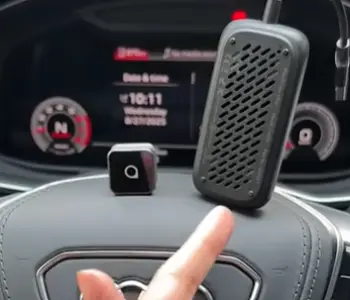
- Affordable Entry Point: One of the biggest wins for me was the price. Ottocast gives you solid wireless freedom without forcing you to spend a lot.
I picked up a model that cost noticeably less than premium options, and it still delivered reliable daily performance.
This makes it ideal if you’re testing the wireless waters or working with a tighter budget while wanting real improvements over cables.
- Tiny Footprint: The compact design is genuinely impressive.
It slips into the USB port and basically vanishes, which mattered a lot in my smaller console area.
No bulky boxes taking up space or looking out of place.
I could leave it plugged in permanently without it interfering with other controls or looking messy.
- Versatile for Families: Living with both iPhone and Android users in the house, I loved how Ottocast managed both platforms without complaints.
It saved me from buying separate solutions. Switching between my phone and my partner’s felt straightforward enough for everyday mixed use, reducing arguments over whose device connects first.
- Quick Daily Use: Automatic reconnection worked reliably during my regular commute.
Most mornings it linked up fast after I started the engine, letting me jump straight into navigation and playlists.
This consistency in short trips made my routine smoother and less frustrating.
- Improved Audio Quality: Thanks to the 5GHz Wi-Fi, music and podcasts came through clearer with minimal static or drops.
I noticed better sound separation compared to my old wired setup, especially when streaming high-quality tracks.
It made long drives more enjoyable without constant adjustments.
- Simple No-App Setup: For many models, you plug it in, pair once, and you’re done.
I appreciated not needing extra software right away, which lowered the barrier for quick installation.
Even non-techy family members could use it without issues after the first connection.
These strengths made Ottocast feel like a practical, no-fuss solution that punched above its weight in convenience and value for my needs.
Cons Of Ottocast
- Battery Impact: This one hit me during longer drives. I saw my iPhone battery drop faster than usual when using Ottocast, especially in warmer weather when the adapter stayed active longer.
On a couple of road trips, I ended up needing a portable charger more often than expected, which took away some of that wireless freedom feeling.
- Occasional Inconsistencies: While mostly reliable, there were moments in certain vehicles or after phone updates where reconnection lagged or failed completely.
I had to restart the car or forget the device a few times, which broke the flow during busy mornings. It wasn’t constant, but enough to notice compared to more stable options.
- Build Feel: The plastic housing feels lightweight and a bit basic when you handle it. It works fine, but it lacks that solid premium touch.
After a few weeks, I worried slightly about long-term durability if it gets knocked around during cleaning or travel.
- Limited Advanced Switching: For households with frequent driver changes, the multi-user experience wasn’t as smooth as I hoped.
Switching profiles took more steps than ideal, leading to brief delays that added up over multiple short trips in a shared car.
- Potential Heat Buildup: During extended use in hot summer conditions, the unit warmed up noticeably.
It never failed, but it made me cautious about leaving it in direct sunlight or extreme temperatures, adding a small layer of monitoring I didn’t expect.
- Customer Service Variability: Depending on where you buy, support experiences can differ.
I had a minor question early on and found responses helpful but slower than hoped, which might frustrate someone needing quick fixes.
I experienced these issues firsthand, particularly the battery drain and occasional hiccups, which pushed me to compare more carefully before deciding on my long-term pick.
Key Features Of AAWireless
- Premium Build: Metal casing provides a sturdy, high-quality feel that inspires confidence in daily use.
- Seamless Device Switching: Physical button or app-based toggle makes jumping between iPhone and Android effortless.
- Strong OTA Support: Regular over-the-air updates keep it compatible with new phone software and fix issues promptly.
- Dual Wireless Excellence: Handles both CarPlay and Android Auto with minimal latency.
- Multi-User Optimization: Designed with households or shared vehicles in mind, remembering multiple profiles.
- Reliable Auto-Connect: Boots fast and maintains stable connections even on longer drives.
- App Integration: Dedicated app allows customization and monitoring that enhances the experience.
Pros Of AAWireless
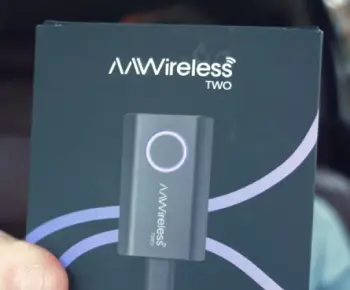
- Exceptional Reliability: This stood out massively in my testing. AAWireless maintained connections through highway speeds, tunnels, and spotty signal areas with very few dropouts.
Over weeks of use, it felt dependable every single drive, giving me confidence that maps, music, and calls would stay active without interruptions that could distract me on the road.
- User-Friendly Switching: The physical button for profile switching became a game-changer in my multi-driver household.
No more repeated pairing or app fiddling when my partner or kids hopped in.
It remembered preferences smoothly, saving time and reducing frustration during quick errands or family outings.
- Long-Term Support: Regular OTA updates kept everything current. When phone software updated, the adapter adjusted automatically without me digging into settings.
This future-proofing meant I didn’t worry about it becoming obsolete quickly, unlike some cheaper gadgets I’ve used before.
- Premium Durability: The metal build not only looks and feels better but holds up well to daily handling.
It resisted scratches and felt secure plugged in, giving a sense of quality that matched higher expectations for something I use every day.
- Lower Perceived Latency: Audio stayed crisp and navigation responsive even during heavy streaming.
Siri and Google Assistant commands processed quickly, and calls had excellent clarity. This smoothness made the whole driving experience more immersive and less tiring on longer journeys.
- Strong Community Feedback Alignment: Many real users I related to reported years of solid performance, which matched what I saw.
The consistency across different cars and conditions made me trust it more for everyday reliability and occasional adventures.
These advantages turned AAWireless into my preferred choice for a polished, worry-free upgrade that handled real-life driving chaos effectively.
Cons Of AAWireless
- Higher Price Point: It costs more upfront than basic Ottocast models, which might make budget-conscious buyers pause.
While I found the extra investment worthwhile for the features, it could feel steep if you’re only looking for basic wireless functionality without all the bells and whistles.
- Slightly Larger Design: Though still compact, it isn’t as miniature as Ottocast options.
In very tight console spaces, it took a bit more care to position, though it never caused real issues in my car.
- Android Heritage: Setup sometimes leaned a little toward Android users initially, requiring a couple extra steps for my iPhone.
Once running, CarPlay worked great, but the first-time experience had minor nuances that pure Apple-focused adapters might avoid.
- Dependency on App: Some customization and monitoring features needed the companion app, which added a small extra download and learning curve.
Not a huge deal, but it meant one more thing to manage compared to completely app-free alternatives.
- Availability Fluctuations: Popular versions can go out of stock or have delivery waits, which delayed my initial testing.
Planning ahead became necessary rather than grabbing one immediately.
- Power Management: It still draws some power, and in certain vehicles with aggressive USB shutdowns, reconnection could occasionally need a manual nudge.
While better than Ottocast in my tests, it wasn’t completely invisible in every scenario.
These points are relatively minor for most drivers but important to consider if price, size, or absolute simplicity rank highest on your list.
Real User Experiences And Performance Breakdown
When I first started comparing these, I focused on my morning commute.
Ottocast connected quickly and delivered clear navigation directions without much lag. Music streamed nicely, and Siri responded promptly.
However, after a week of mixed iPhone and Android use in my household, I noticed the phone battery dipping faster than expected, especially on hot days when the adapter worked harder to maintain the link.
AAWireless changed that for me. The metal build felt reassuring, and the button to switch profiles became my favorite feature when my partner hopped in.
Connections were snappier overall, and I experienced fewer random disconnects during longer highway stretches.
Navigation stayed accurate, calls came through crystal clear, and the OTA updates fixed a minor glitch I saw early on without any effort from me.
Both adapters eliminate cable clutter effectively, which was my main goal. No more fumbling with cords while balancing coffee.
But AAWireless felt more “set it and forget it,” while Ottocast excelled in sheer compactness for my smaller console space.
How They Handle Everyday Driving Scenarios?
Think about parking lot errands. Ottocast’s tiny size means it stays plugged in discreetly, and you barely notice it.
Starting the car leads to quick wireless handoff for Apple Maps or Google Maps. I appreciated this during short stops where every second counts.
On longer trips, AAWireless’s stability shone. No mid-drive dropouts when passing through spotty areas, and audio quality held up better during high-volume podcasts.
The multi-user aspect made weekend family drives seamless—switch once, and everyone gets their preferred interface.
For calls, both performed well, but AAWireless handled hands-free switching with less interruption.
Battery-wise, I monitored closely: Ottocast used more juice on my iPhone during extended sessions, prompting me to carry a small charger more often.
AAWireless was kinder there, aligning better with all-day driving.
Which One Should You Choose?
If compactness and value top your list, especially for solo or light mixed use, Ottocast delivers strong everyday performance.
For premium reliability, effortless switching, and long-term peace of mind in a shared vehicle, AAWireless stands out as the more refined choice in my experience.
I leaned toward AAWireless for my needs because of the consistent reliability and multi-user features, but your priorities might differ. Test compatibility with your specific car model either way.
Also Read: Is Ottocast U2 Air Pro Worth It?
Frequently Asked Questions (FAQ)
AAWireless often edges it out for reliability and multi-device switching, though it depends on your car and usage.
Yes, it works well for most users in compatible vehicles, delivering reliable wireless connectivity after initial setup.
It can cause noticeable phone battery drain during longer drives, more so than some alternatives, but varies by model and conditions.
AAWireless TWO+ earns strong praise for consistency, regular updates, and stable performance across many setups.
In Wrapping This Up
I’ve shared my honest take after real testing because I know how frustrating wired connections can be on busy days.
You deserve an adapter that makes driving more enjoyable rather than adding hassle.
Whether you go with Ottocast’s compact convenience or AAWireless’s polished reliability, both beat fumbling with cables every single time.
Consider your vehicle, phone ecosystem, and how many people use the car regularly, then pick what fits. I hope this helps you decide confidently—your next drive will feel so much freer.
Recent Posts
● Interactive 5-Zone Interior & Exterior Paint Blueprint Paint Coverage Calculator: Gallons, Primer, Square Footage & Cost Tap any architectural surface zone on the blueprint...
If you want smooth, shiny hair without spending a fortune on a premium styling tool, the Ella Bella hair dryer may be worth considering.In these Ella Bella hair dryer reviews, I’ll look...