
I have spent the last several months juggling both the Samsung T7 and T9 portable SSDs in my daily workflow.
From backing up thousands of family photos and videos to editing 4K footage on the go and moving massive game libraries between my laptop, desktop, and phone, these two drives became constant companions.
If you find yourself staring at product pages wondering which Samsung portable SSD makes more sense for your needs, I wrote this article based on actual experience to help you decide.
My main intent here is to share honest insights from real daily use so you can see the practical differences in speed, portability, durability, and value.
By the end, you will have a clear picture of whether the T7’s lightweight convenience suits you better or if the T9’s extra power and toughness justify stepping up.
I approach this as one user to another—no hype, just what worked and what felt different in my hands.
| Feature | Samsung T7 | Samsung T9 |
| Max Read Speed | Up to 1,050 MB/s | Up to 2,000 MB/s |
| Max Write Speed | Up to 1,000 MB/s | Up to 2,000 MB/s (4TB), ~1,950 MB/s others |
| Interface | USB 3.2 Gen 2 (10Gbps) | USB 3.2 Gen 2×2 (20Gbps) |
| Capacities | 500GB, 1TB, 2TB (some 4TB) | 1TB, 2TB, 4TB |
| Dimensions | 85 x 57 x 8 mm | 88 x 60 x 14 mm |
| Weight | ~58g | 122g |
| Drop Resistance | Up to 2 meters | Up to 3 meters |
| Warranty | 3 years | 5 years |
| Thermal Design | Standard aluminum | Improved with Dynamic Thermal Guard |
| Best For | Everyday portability & value | Pro workloads & future-proofing |
Key Differences Between The Samsung SSD T7 And T9
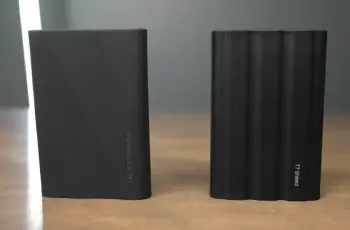
The differences between these two SSDs became obvious the moment I started switching them during my routine tasks. Here is what stood out to me after weeks of testing:
- Speed and Real-World Performance: The T9 delivers noticeably quicker transfers when your device supports the faster interface.
For example, copying a 100GB folder of raw photos or video clips took roughly half the time on the T9 compared to the T7 on compatible ports.
The T7 still feels quick for most everyday jobs like moving documents or smaller media files, but you sense the gap during bigger operations.
- Build and Size: The T7 wins on pure portability with its slim aluminum body that slides into a pocket effortlessly.
The T9 feels more substantial and grippy thanks to its textured exterior, which I appreciated when pulling it out of a bag quickly, but it adds noticeable bulk.
- Durability and Longevity: The T9 handles higher drops and includes better heat management, meaning I worried less about it during travel or long editing sessions.
The T7 is tough enough for careful use but requires a bit more caution.
- Capacity Options and Value: The T7 lets you start small and affordably, perfect if you do not need massive space right away.
The T9 focuses on larger capacities from the start, making it feel like an investment for growing storage needs.
- Compatibility in Practice: Both work seamlessly across devices I own, but the T9 shines brightest only with the right ports.
On standard connections, it still performs well but closer to T7 levels, so checking your hardware matters.
These points shaped my decisions on which drive to grab for specific activities, and understanding them helps match the right tool to your habits.
Key Features Of The Samsung T7
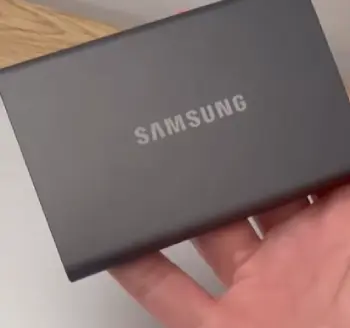
I really came to appreciate several standout features of the T7 that make it a go-to for lighter days.
- Ultra-Portable Design: Weighing around 58 grams and measuring just 85 x 57 x 8 mm, this drive disappears in your pocket or small bag compartment.
I carried it daily during commutes and weekend trips without it weighing me down or creating bulk. It feels like an extension of my phone rather than extra gear.
- Solid Speeds for Everyday Use: With reads up to 1,050 MB/s, I could offload a full day’s worth of 4K footage from my camera in just a few minutes.
Writing speeds around 1,000 MB/s kept things responsive when saving edits or backing up projects. It never left me waiting long enough to get frustrated during normal tasks.
- Reliable Aluminum Build: The metal casing gives a premium, sturdy feel that resists scratches better than plastic alternatives.
After months of use, it still looks fresh despite being tossed into bags regularly.
- Hardware Encryption: Setting up AES 256-bit protection through the simple Samsung software gave me confidence when carrying client files or personal documents.
The process takes minutes and works reliably across platforms.
- Broad Device Support: It connected flawlessly to my Windows laptop, MacBook, Android phone, gaming consoles, and even some tablets.
No compatibility headaches ever interrupted my flow.
- Affordable Entry Point: The pricing allowed me to pick up extra units without hesitation, making it easy to dedicate one drive to photos, another to videos, and keep everything organized.
These features turned the T7 into my reliable daily driver for tasks where convenience matters most.
Pros Of The Samsung T7
Living with the T7 highlighted many advantages that keep it relevant and appealing.
- Excellent Portability: Its slim profile and light weight mean I can take it anywhere without planning. Students, frequent travelers, or busy professionals benefit hugely because it fits naturally into any routine without adding hassle.
- Strong Everyday Performance: For photo libraries, document backups, casual video editing, or game saves, the speeds deliver satisfying responsiveness. I transferred hundreds of gigabytes over months and rarely felt bottlenecked in normal scenarios.
- Lower Price Tag: This allowed me to buy multiple drives for different purposes, which improved my organization. It offers fantastic bang for the buck when maximum speed is not the top priority.
- Proven Reliability: After extended daily use across devices and environments, it performed consistently without errors or disconnections. That dependability builds trust over time.
- Color Options: The variety of finishes like blue, red, or gray helps me quickly identify which drive contains what data at a glance—small detail that improves workflow.
- Lightweight and Pocketable: This is the feature I miss most when using the T9. It encourages carrying your data everywhere, making spontaneous backups or shares easy.
These strengths make the T7 a smart, no-regrets choice for a wide range of users.
Cons Of The Samsung T7
No product is perfect, and extended use revealed some limitations worth considering.
- Slower on Big Jobs: When moving very large folders or working with high-resolution video, the transfer times extend compared to the T9. I noticed this during deadline crunch periods where every minute counts.
- Shorter Warranty: Three years feels adequate but less reassuring than five, especially if you plan to keep the drive long-term as your primary backup.
- Basic Thermal Handling: During marathon sessions exceeding 30-45 minutes of continuous writing, it warms up and may slow slightly to protect itself. I learned to space out big transfers or ensure good airflow.
- Lower Drop Rating: While sturdy, the 2-meter resistance means I stay more mindful during active use compared to tougher options.
- Limited Max Capacity in Some Variants: Finding the largest sizes can be trickier or more expensive in certain markets, pushing some users toward other choices for massive storage needs.
These points matter more for power users but remain manageable for most.
Key Features Of The Samsung T9
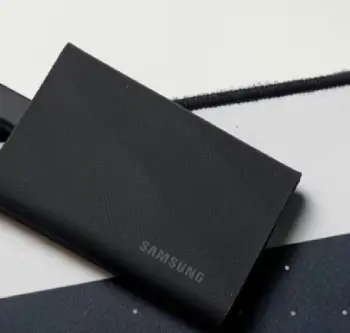
The T9 impressed me with upgrades that target heavier workloads, and I found myself reaching for it more during intensive projects.
- Blazing Fast Transfers: On ports that support the full 20Gbps interface, this drive cuts transfer times dramatically.
A large 100GB video project that took nearly two minutes on the T7 finished in about one minute here. That time savings adds up fast when you handle multiple files daily.
- Improved Heat Management: Thanks to the Dynamic Thermal Guard, the T9 stayed cooler and maintained higher speeds longer during sustained copying or direct editing.
I ran hour-long backups without the performance drops I sometimes noticed on the T7.
- Tougher Exterior: The rubberized, textured surface provides excellent grip even with sweaty hands after a shoot, and the 3-meter drop resistance gave me peace of mind when moving between locations. It feels built for real-world bumps.
- Larger Capacity Focus: The 4TB version easily holds my entire active project archive plus safety backups.
I spent less time managing space and more time creating.
- Longer Warranty: Five years of coverage made the investment feel safer, especially knowing I rely on it for important work files that I cannot afford to lose.
- Dynamic Thermal Guard Technology: This feature actively helps prevent overheating, letting me work directly off the drive for video timelines without lag or worry.
It simply performs more consistently under pressure.
These elements make the T9 feel like a professional tool tailored for demanding users.
Pros Of The Samsung T9
The T9 delivered clear benefits that stood out during intensive work periods.
- Massive Speed Boost: The near-doubling of transfer rates transformed how I handle large projects. Video exports, raw file offloads, and game library moves complete much faster, freeing up time for actual creative work instead of waiting.
- Better Sustained Performance: I could edit timelines or render previews directly from the drive with fewer interruptions. The consistent speeds during long sessions reduced frustration significantly.
- Enhanced Durability: Higher drop protection and the grippy texture made it my preferred choice for outdoor shoots or travel. It survived several minor tumbles without issue.
- Future-Proof Design: As devices gain faster ports, the T9 will continue delivering full performance longer, protecting my investment over years.
- 5-Year Warranty: This extra coverage aligned with how heavily I use external storage, giving confidence that support exists if needed.
- Holds More Data Comfortably: Larger capacities reduce file shuffling, letting me keep everything in one reliable place for quick access.
These advantages make intensive tasks feel smoother and more professional.
Cons Of The Samsung T9
I also encountered drawbacks that might influence your decision.
- Higher Cost: The premium price requires justification through time savings or specific needs. For casual users, it can feel like overpaying for capabilities you might not fully use.
- Bulkier and Heavier: At 122 grams and thicker dimensions, it does not slip into pockets as easily. I noticed the difference immediately on travel days when minimalism matters.
- Speed Depends on Your Ports: Without a 20Gbps-compatible connection, you lose much of the advantage, making it perform similarly to the T7 in many setups. Verifying your hardware first is essential.
- Attracts Dust: The textured surface collects lint and particles readily, requiring occasional cleaning to keep it looking sharp.
- Overkill for Casual Use: If your transfers stay under 50GB regularly, the extra speed and features provide diminishing returns compared to the simpler T7.
Weighing these helps ensure you select based on actual habits rather than specs alone.
My Real User Experience Switching Between Them
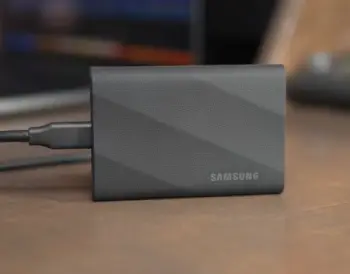
Starting with the T7 felt refreshing because it solved so many small frustrations I had with slower storage.
I could quickly back up phone photos during outings or move documents between work and home without delay.
Its slim size encouraged constant carrying, turning spontaneous moments into productive ones. Over months, as my video projects expanded and file sizes ballooned with higher resolutions, I craved faster options.
Adding the T9 changed my workflow noticeably. During a week-long editing sprint, the reduced transfer times let me iterate faster and meet tighter deadlines.
The better grip and toughness suited field work perfectly—I filmed outdoors, dropped the drive once onto grass, and continued without worry. Both drives integrate well with Samsung’s software for monitoring and security, but the T9’s thermal edge meant fewer pauses even on hot days.
I keep the T7 for quick daily tasks and light travel. The T9 stays dedicated to heavy projects and larger archives.
This combination works best for me, and trying both helped me understand personal priorities around size versus speed.
Performance In Different Scenarios
Different lifestyles highlight unique strengths. For students managing assignments, lecture recordings, and media files, the T7 provides ample speed and unmatched portability.
I used it successfully for semester backups, transferring everything needed for a laptop refresh in under 15 minutes per drive.
Photographers and videographers see bigger gains from the T9. Offloading hundreds of RAW images or long clips happens swiftly, and sustained speeds support editing straight from the drive.
On a recent trip, I used the T7 for phone backups and the T9 for main camera footage, appreciating how each fit its role.
Gamers benefit from either when expanding console or PC storage. The T7 handles most installs smoothly, while the T9 accelerates large updates and library moves, especially valuable with modern game sizes.
Office professionals or general users find the T7 sufficient for documents, presentations, and backups, keeping costs down while maintaining reliability.
Choosing Based On Your Needs
Your decision comes down to matching the drive to daily realities. If portability and value top your list, the T7 delivers consistently without compromise for most situations.
You gain freedom to carry storage everywhere and still enjoy fast performance.
For those working with large media files, tight deadlines, or rough conditions, the T9 provides meaningful improvements in speed and resilience. The longer warranty and capacity options support heavier reliance over years.
I always suggest evaluating your average file sizes, device ports, travel frequency, and budget. Testing ports on your main devices gives the clearest preview of potential gains.
Both options represent quality Samsung engineering that will serve you well.
Thermal Performance And Longevity
Heat management affects daily usability more than many realize. The T7 performs admirably for typical sessions but benefits from breaks during very large transfers to avoid warming.
I developed habits like placing it on a hard surface for airflow, which kept it running smoothly.
The T9’s design handles prolonged activity better, staying cooler and delivering steady performance. In my tests moving terabytes over time, it maintained higher averages with less variation.
This consistency likely contributes to better long-term reliability, reinforced by the extended warranty. Both drives last well with normal care, but the T9 feels more robust for intensive users.
Security Features I Actually Use
Security matters when carrying important data. Both support strong AES 256-bit hardware encryption that I enabled on sensitive drives.
The Samsung software makes setup straightforward with password options that add protection without major speed penalties in practice.
I use it for client work and personal archives, knowing files stay safer if a drive is ever lost. Cross-platform compatibility means I manage security easily regardless of the device.
Also Read: Comparison Of Samsung T9 And Crucial X10
Frequently Asked Questions (FAQ)
No, the T7 remains widely available and continues as a popular choice for reliable portable storage.
Yes, the T9 excels with fast speeds, strong durability, and solid thermal performance—great for demanding users.
Market factors like high demand for storage have pushed prices up across many SSDs, though deals appear periodically.
It handles heat well thanks to improved design and stays within safe temperatures even during extended use, with minimal throttling in my experience.
Wrapping Up
After months of real use, I still recommend evaluating your specific situation carefully.
The T7 remains my favorite for most people because it balances everything well—fast enough, light enough, and priced accessibly. You get dependable performance that improves daily life without excess.
Step up to the T9 if your work involves frequent large files, direct editing, travel in tougher conditions, or you simply want the latest capabilities.
The speed and durability enhancements create a noticeably better experience for demanding tasks.
Consider your current devices, typical file handling, and how you want storage to fit your lifestyle. Either choice from Samsung gives you reliable, high-quality portable SSD performance you can trust.
I hope sharing my experiences helps you select confidently and start enjoying faster, more convenient data management right away. You deserve tools that work with you, not against you.
Recent Posts
Uromend prostate supplement has attracted attention from men looking for additional support for prostate health, urinary comfort, and overall wellness. But is it worth buying? I believe...
I spent months sorting through my own thinning hair and the endless options online before settling on a clear path. My goal here is simple: give you a straightforward real-user breakdown of...