
You should buy the Vankyo Leisure 3 Pro Projector right now if you want to turn your boring living room into a massive cinema without emptying your entire savings account. I have spent years looking for a budget-friendly way to enjoy movies on a 150-inch screen, and this projector finally delivers the sharpness and brightness that actually makes movie night feel special.
You deserve a high-quality viewing experience that fits in a small bag, and this specific model is the most reliable entry-point for anyone wanting big-screen magic on a modest budget today.
My Experience With Vankyo Leisure 3 Pro
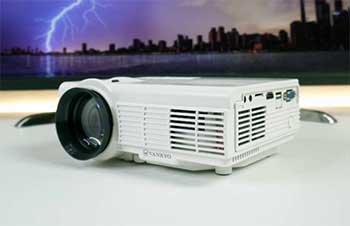
I have been a home theater enthusiast for a long time, but I always felt like high-end projectors were out of my reach because they usually cost more than my first car.
When I finally got my hands on the Vankyo Leisure 3 Pro, I was honestly expecting a toy-like experience given the price, but I was pleasantly surprised by how heavy and well-built it felt in my hands.
The setup was incredibly straightforward, and within five minutes of opening the box, I had a giant image beamed onto my bedroom wall that looked shockingly better than my old 40-inch television.
The first thing I noticed was how much the “Pro” tag actually mattered compared to the standard model, especially regarding the crispness of the edges and the overall color saturation during dark scenes.
I decided to test it with a classic action movie, and the 1080p native resolution really shined through, showing the textures of clothing and facial details that are usually lost on cheaper, lower-resolution units. It wasn’t just a blurry mess of light; it was a genuine cinematic image that felt immersive enough to make me forget I was just sitting in my small apartment.
I also spent a lot of time testing the wireless mirroring feature because I hate having cables snaking across my floor where people can trip on them. Connecting my phone via the 5G WiFi was a breeze, and I was able to cast YouTube videos and personal photos to the big screen with almost zero lag or stuttering. I even took it outside for a backyard movie night, and even with a little bit of ambient light from the streetlamps, the 170 lumens provided enough punch to keep the image visible and engaging for all my guests.
The internal speaker was surprisingly decent for a small unit, but I eventually hooked up my own Bluetooth soundbar to really round out the theater feel. I found that the cooling fan, while definitely audible, quickly faded into the background once the movie started playing at a reasonable volume level. After three months of nearly daily use, the Leisure 3 Pro has become the centerpiece of my entertainment routine, proving that you don’t need a professional theater budget to get a professional-looking screen in your own home.
Also Read: Comparison of Sofabaton X1 And X1s
Pros Of Vankyo Leisure 3 Pro
- Native Resolution Clarity: Unlike many competitors that only “support” high definition while projecting a blurry image, this model features a true native 1080p resolution that ensures every pixel is sharp and clear for a realistic viewing experience.
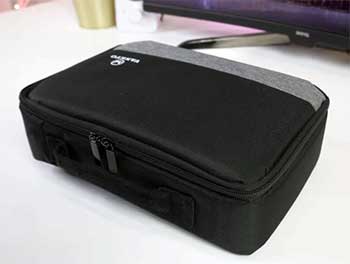
- Compact Portability Factor: The projector is small enough to fit into its included custom carrying case, making it incredibly easy for you to take your cinema setup to a friend’s house or on a camping trip without any hassle.
- Dual Band Connectivity: By supporting both 2.4G and 5G WiFi frequencies, the device allows you to enjoy a much more stable and faster wireless mirroring experience with your smartphone or tablet compared to older, single-band budget projectors.
- Bluetooth Audio Support: You can easily bypass the internal speakers by wirelessly connecting your favorite Bluetooth soundbar or headphones, giving you total control over your audio environment without needing long, messy auxiliary cables across the room.
- Impressive Screen Scale: This unit can project an image up to 150 inches in size, which completely dwarfs even the largest consumer televisions and provides a truly massive “front row” feel for sports and blockbuster movies alike.
- Versatile Port Selection: With HDMI, USB, VGA, and AV inputs, you can connect almost any device imaginable, from modern gaming consoles like the PS5 to older laptops and streaming sticks like the Roku or Fire TV.
- Enhanced Lamp Longevity: The LED light source is rated for up to 30,000 hours of use, meaning you could watch a two-hour movie every single day for over forty years before needing to worry about the bulb burning out.
- User Friendly Interface: The menu system is simple and intuitive, allowing you to quickly adjust your brightness, contrast, and input sources without having to hunt through complicated sub-menus or technical jargon that ruins your relaxation time.
- Custom Carrying Bag: Most budget brands force you to buy a case separately, but Vankyo includes a high-quality, padded bag that protects your investment from dust and scratches while you are on the move between different locations.
Cons Of Vankyo Leisure 3 Pro
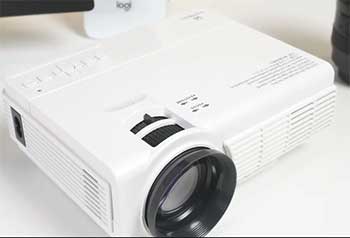
- Fan Noise Levels: The internal cooling system is quite powerful and generates a constant humming sound that might be distracting during very quiet movie scenes if the projector is sitting right next to your head.
- Edge Blur Sensitivity: I noticed that if you don’t have the projector perfectly perpendicular to your wall, the very corners of the image can sometimes lose focus, requiring you to spend extra time on your physical placement.
- Dark Room Requirement: While it is bright for its class, this is not a daylight projector, so you will definitely need to draw your curtains or wait until the sun goes down to get a vivid image.
- Limited Keystone Correction: The manual keystone adjustment only allows for vertical correction, which means you can’t place the projector at a sharp side angle and still get a perfectly rectangular image on your projection screen.
- Internal Speaker Limits: While the 5W speaker works in a pinch for small rooms, it lacks the deep bass and immersive volume needed for a true theater experience, making external speakers almost a necessity.
- DRM Content Restrictions: Due to copyright protections, you cannot mirror apps like Netflix or Disney Plus directly from your phone, which requires you to use an external streaming stick to enjoy those specific popular services.
- Plastic Lens Material: The lens is made of a high-quality plastic rather than professional glass, which makes it more susceptible to fine scratches if you aren’t extremely careful when cleaning off dust or fingerprints.
Also Read: Comparison of Eufy E110 And E210
Maintenance Tips For Vankyo Leisure 3 Pro
- Microfiber Cleaning Only: You should only ever use a clean, dry microfiber cloth to wipe the lens, as using paper towels or your shirt can leave permanent microscopic scratches that will eventually blur your projected image.
- Ventilation Space Requirements: Always leave at least six inches of open space around the air vents to prevent the internal components from overheating, which can lead to a shortened lifespan for the delicate LCD display panel.
- Dust Filter Inspection: You should check the air intake filter every few weeks and gently blow out any accumulated dust with compressed air to ensure that the cooling fan can pull in enough fresh air.
- Cool Down Period: Never unplug the power cord immediately after turning the unit off; let the fan run through its automatic cooling cycle to safely dissipate the heat from the LED bulb and internal electronics.
- Avoid Humid Areas: You must store your projector in a dry environment, as excessive moisture can lead to mold growth on the internal lenses or corrosion on the sensitive HDMI and USB port connections.
- Firmware Update Checks: Periodically check the manufacturer’s website for any available firmware updates that can improve WiFi stability and fix minor software bugs that might crop up over months of regular use in your home.
- Lens Cap Usage: Always place the protective lens cap back on the unit immediately after it has cooled down to prevent airborne dust particles from settling into the crevices of the focus and keystone rings.
- Stable Surface Placement: Ensure you always use the included tripod or a very sturdy table to prevent micro-vibrations from the fan, which can cause the image to shake slightly and lead to unwanted eye strain.
- Safe Cable Storage: When you are packing the projector into its carrying bag, avoid wrapping the cables too tightly, as this can cause internal wire breakage that leads to flickering or a complete loss of signal.
Comparison With Other Brands
- AuKing Mini Projector
The AuKing is a massive seller on many platforms, but I found that the Leisure 3 Pro offers a significantly more robust build quality and better internal software for wireless mirroring.
While the AuKing is often a few dollars cheaper, the Vankyo’s “Pro” resolution provides a much more professional look for text and fine details that the AuKing sometimes struggles to render clearly.
- PVO Portable Projector
PVO is a great ultra-budget option for kids, but it feels like a toy compared to the more serious home theater capabilities of the Vankyo Leisure 3 Pro.
The PVO usually has a much lower native resolution and far fewer input options, making the Vankyo a much smarter long-term investment for adults who actually care about picture quality.
- TOPVISION Native 1080P
TOPVISION offers a very similar spec sheet, but in my testing, their fan was significantly louder and the color accuracy felt a bit too “cool” and blue-tinted. The Vankyo Leisure 3 Pro has a more natural color palette out of the box, making it much easier for you to enjoy movies without having to spend hours fiddling with the settings.
- Epson Refurbished Models
If you go for a refurbished Epson, you will get incredible brightness, but you will also pay three times the price and lose the compact portability that the Leisure 3 Pro offers. For most casual users, the trade-off in brightness is worth the massive savings and the ability to easily tuck the projector away in a drawer when it is not in use.
- TMY Projector With Screen
TMY often bundles a free 100-inch screen with their units, which is a nice touch, but the actual projector hardware often feels a bit flimsy and prone to overheating. I personally prefer buying the Vankyo Leisure 3 Pro and a separate high-quality screen, as the Vankyo’s internal cooling system and lens quality feel much more reliable for daily use.
- DR. J Professional Projector
The DR. J Professional was a king of the budget market for a while, but it has started to feel dated as it lacks the 5G WiFi and Bluetooth features of the Leisure 3 Pro. Vankyo has modernized their lineup much faster, giving you the latest wireless tech that makes connecting your modern devices a much more seamless and frustration-free experience.
Frequently Asked Questions (FAQ)
The Vankyo Leisure 3 Pro features a native 1920x1080p resolution, which is a major upgrade from the 720p or 480p found on standard budget projectors. This means it actually projects over two million pixels onto your wall, resulting in a much sharper and more detailed image that doesn’t look “fuzzy” or pixelated when you blow it up to a large size.
If you can see the movie but can’t hear anything, it is most likely because the video you are playing uses Dolby Audio, which is not natively supported by most budget projectors. You can easily fix this by going into the settings of your Fire Stick or Apple TV and changing the audio output format to “PCM” or “Stereo” to restore the sound.
While the Leisure 3 Pro is brighter than many other mini projectors, it is still designed primarily for dark or dimly lit rooms. If you try to use it in a room with bright sunlight, the image will appear very washed out and hard to see; for the best experience, you should use blackout curtains or wait until the evening.
To get a clear image, you first need to ensure the projector is at the correct distance from the wall and then use the manual focus ring located just behind the lens. If the top of the image is clear but the bottom is blurry, you may need to adjust the keystone ring or ensure the projector is sitting perfectly level on its surface.
Conclusion
If you are ready to stop watching movies on your tiny laptop screen and want to experience the thrill of a real cinema at home, you should buy the Vankyo Leisure 3 Pro Projector today.
It is rare to find a device that balances price, portability, and performance this effectively, and it has completely transformed how I enjoy my favorite shows and games. You deserve to have a theater-quality experience without the theater-sized price tag, so grab this projector and start planning your first big-screen movie night this weekend.
Recent Posts
● Interactive 5-Zone Interior & Exterior Paint Blueprint Paint Coverage Calculator: Gallons, Primer, Square Footage & Cost Tap any architectural surface zone on the blueprint...
If you want smooth, shiny hair without spending a fortune on a premium styling tool, the Ella Bella hair dryer may be worth considering.In these Ella Bella hair dryer reviews, I’ll look...