
If you enjoy creating personalized clothing, decorative gifts, monograms, or custom embroidery projects, the Brother PE900 is a machine worth considering.
I like its combination of a generous embroidery area, touchscreen controls, wireless design transfer, and beginner-friendly features.
For home-based embroidery enthusiasts and small creative businesses, I believe it’s a worthwhile investment if you want convenience and room to grow your skills.
My First Experience With The Brother PE900 Embroidery Machine
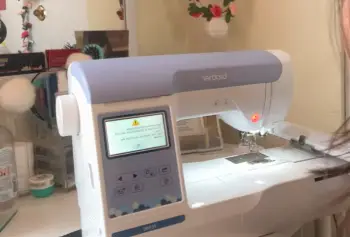
When I look at an embroidery machine, I pay attention to more than its advertised features.
I want to know whether it makes everyday projects easier, produces attractive results, and gives me enough creative freedom without making the process unnecessarily complicated.
The Brother PE900 checks several of these boxes.
The first thing I appreciate about this machine is its dedicated embroidery functionality. Unlike a traditional sewing machine, the PE900 is designed specifically for embroidery projects.
This makes it appealing if your main goal is decorating garments, personalizing accessories, and creating detailed stitched designs.
Its 5-by-7-inch embroidery field is particularly useful. I can imagine using this space for larger shirt designs, decorative patterns on pillow covers, personalized towels, and names on jackets. The extra room compared with smaller embroidery machines gives me more flexibility when choosing projects.
Another feature that stands out is the 3.7-inch color touchscreen. Instead of relying entirely on physical buttons, I can use the display to select designs, adjust settings, and preview embroidery patterns.
This makes the overall process feel more modern and accessible.
I also appreciate the wireless design transfer capability. Compatible embroidery designs can be transferred through the machine’s wireless connection, reducing the need to move files around using USB drives. For someone who regularly experiments with new patterns, this can make the workflow more convenient.
The built-in design collection is another advantage. Having multiple embroidery patterns and lettering options available means I can start creating without immediately purchasing additional designs.
However, I wouldn’t describe the Brother PE900 as perfect. Its dedicated embroidery design means it cannot replace a regular sewing machine. I also need to consider the additional cost of thread, stabilizers, embroidery hoops, and compatible designs.
Overall, I see the PE900 as a practical home embroidery machine for people who want more creative possibilities without investing in an expensive commercial setup.
Also Read: Is Happy Japan Embroidery Machine Worth It?
Pros Of The Brother PE900 Embroidery Machine
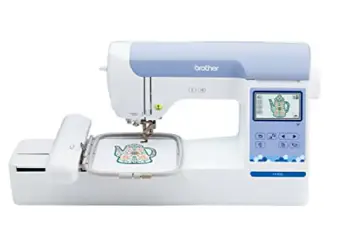
- Generous Embroidery Space
The 5-by-7-inch embroidery field is a major advantage.
I don’t want to feel restricted every time I select a design. A larger embroidery area gives me more opportunities to create noticeable decorations on clothing and accessories.
It’s useful for names, decorative lettering, floral arrangements, and personalized designs.
I also appreciate that the larger field can reduce the need to divide certain designs into multiple sections.
For home users, this flexibility can make a meaningful difference.
- Beginner-Friendly Touchscreen Controls
The color touchscreen makes the machine easier to navigate.
Instead of remembering complicated button combinations, I can work through the available options visually.
I can preview designs, make adjustments, and check positioning before starting embroidery.
This is particularly helpful if I’m new to computerized embroidery and want a machine that feels approachable.
- Wireless Embroidery Design Transfer
I consider wireless design transfer one of the most convenient features.
It gives me the ability to move compatible embroidery designs to the machine without depending entirely on physical storage devices.
If I regularly download new patterns or create custom designs, wireless connectivity can simplify my workflow.
It also makes the machine feel more suitable for modern home crafting.
- Plenty of Built-In Designs
The 193 built-in embroidery designs provide a useful creative starting point.
I can experiment with different patterns before spending additional money on external design collections.
This is valuable because beginners may not immediately know which embroidery styles they prefer.
Having different designs available encourages experimentation and makes the machine more enjoyable to use.
- Useful Lettering Options
Personalization is one of the biggest reasons people purchase embroidery machines.
The PE900 includes built-in lettering fonts that allow users to create names, initials, and decorative text.
I particularly like this feature for making personalized towels, baby blankets, gifts, and clothing.
It can also be useful for small creative businesses offering customized products.
- Automatic Needle Threading
The automatic needle threader saves time during preparation.
Although it may take a little practice to use correctly, I appreciate not having to struggle with threading the needle manually every time.
For people who frequently change threads or work on several projects, this feature can make embroidery sessions more comfortable.
- Automatic Thread Cutting
Automatic thread cutting is another practical convenience.
The machine can trim threads during embroidery operations, helping reduce some manual work.
This makes the process smoother, particularly when a design contains multiple color changes or separate stitching sections.
Cons Of The Brother PE900 Embroidery Machine
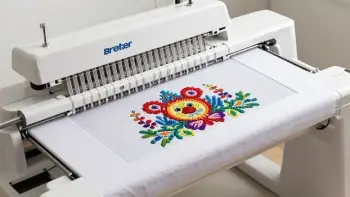
- It Cannot Perform Regular Sewing
This is probably the biggest limitation.
The Brother PE900 is an embroidery-only machine. It isn’t designed to sew seams, attach zippers, repair clothing, or perform ordinary garment construction.
If you want one machine for both sewing and embroidery, you’ll need to consider a combination model instead.
- Single-Needle Operation
The single-needle setup means users must change thread colors as required by embroidery designs.
For occasional home projects, this isn’t necessarily a problem.
However, if I were producing dozens of customized garments every day, repeated thread changes could slow down my workflow.
A multi-needle embroidery machine would be more appropriate for heavier production.
- Additional Supplies Increase the Cost
The purchase price isn’t the only expense.
I would also budget for embroidery thread, stabilizers, needles, fabric, embroidery scissors, and additional designs.
These supplies are essential for getting attractive results.
The total investment can therefore become higher than expected.
- Limited Embroidery Area
Although 5 by 7 inches is generous for many home projects, it isn’t suitable for every large design.
If I wanted to embroider oversized jacket backs or large decorative panels, I might need a machine with a bigger embroidery field.
- Requires Compatible Digital Designs
The machine works with compatible embroidery files.
I cannot assume that every downloaded pattern will work without checking its format, dimensions, and design requirements.
Some designs may also require editing or resizing before they can be used successfully.
- Not Ideal for Heavy Commercial Production
The PE900 is better suited to personal projects, hobby use, and relatively small-scale customization.
A business handling large daily orders may benefit from a commercial multi-needle machine with greater production capacity.
Also Read: Is Brother Skitch Embroidery Machine Worth It?
Maintenance For The Brother PE900 Embroidery Machine
- Clean the Bobbin Area Regularly
Loose thread and fabric lint can accumulate around the bobbin case and surrounding areas.
I recommend checking this area after several embroidery sessions, especially when working with fabrics that produce a lot of lint.
Turn the machine off before cleaning and follow the manufacturer’s instructions for accessing the bobbin area.
Use the appropriate cleaning brush to remove loose debris.
Avoid blowing lint farther inside the machine with compressed air unless the manufacturer specifically recommends it.
- Use High-Quality Embroidery Thread
Thread quality has a direct effect on embroidery appearance.
Poor-quality thread may break frequently, create uneven stitches, or produce inconsistent tension.
I prefer using embroidery thread designed for machine embroidery.
Polyester and rayon embroidery threads are common choices, although the best option depends on the project and fabric.
I would also keep thread away from excessive heat, moisture, and direct sunlight.
- Replace Needles When Necessary
A dull or damaged needle can create skipped stitches, fabric damage, and thread breakage.
I wouldn’t continue using the same needle indefinitely.
For regular embroidery work, inspect the needle frequently and replace it when stitching quality deteriorates or the needle becomes damaged.
Always choose a compatible embroidery needle and follow the machine’s instructions regarding needle sizes.
- Choose the Correct Stabilizer
Stabilizer is one of the most important supplies in machine embroidery.
It supports fabric while the machine creates thousands of stitches.
Without suitable stabilization, fabric can stretch, wrinkle, or become distorted.
For lightweight materials, I might choose a lightweight cut-away or tear-away stabilizer depending on the fabric and design.
Stretchy fabrics generally require more support than stable woven materials.
I would test the stabilizer before starting an important project.
- Keep the Embroidery Hoop Clean
The embroidery hoop needs to hold fabric securely throughout stitching.
If the fabric becomes loose, the design may shift and produce uneven results.
After completing projects, I recommend checking the hoop for dust, thread fragments, and other debris.
I would also avoid overtightening the hoop because excessive pressure can damage delicate materials.
- Avoid Pulling Fabric During Embroidery
One mistake I would avoid is pulling or pushing fabric while the machine is stitching.
The embroidery unit needs to move freely to follow the programmed design.
Interfering with that movement can affect stitch alignment and potentially cause problems.
I would allow the machine to work naturally while keeping loose fabric away from moving components.
Comparison Of Brother PE900 With Other Embroidery Machine Brands
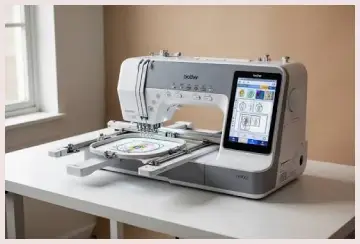
- Brother PE900 vs. Brother PE800
The Brother PE800 is one of the closest alternatives to the PE900.
Both machines offer a 5-by-7-inch embroidery field, making them suitable for similar project sizes.
The PE800 is an older model with a color touchscreen and built-in embroidery designs. The PE900 adds newer connectivity features, including wireless design transfer.
I would favor the PE900 if wireless convenience and newer functionality matter to me.
However, someone who finds a well-maintained PE800 at a significantly lower price may still find it a worthwhile option.
- Brother PE900 vs. Brother SE1900
The Brother SE1900 is a combination sewing and embroidery machine.
This makes it fundamentally different from the PE900.
With the SE1900, I can perform regular sewing tasks as well as embroidery. That flexibility is useful if I want one machine for garment construction, alterations, quilting, and decorative stitching.
The PE900, on the other hand, is dedicated exclusively to embroidery.
I would choose the SE1900 if sewing functionality is important. If embroidery is my main priority, the PE900 makes more sense.
- Brother PE900 vs. Brother PE535
The Brother PE535 is a more basic embroidery-only alternative with a smaller 4-by-4-inch embroidery area.
It can be suitable for beginners who primarily want to create small designs and monograms.
However, the PE900 gives me considerably more room for larger embroidery projects.
I would choose the PE535 if affordability and smaller designs were my main priorities.
For greater design flexibility, I would prefer the PE900.
- Brother PE900 vs. Janome Memory Craft Machines
Janome offers several computerized embroidery machines designed for home users.
Depending on the specific model, these machines can provide different embroidery areas, design editing capabilities, and convenience features.
I wouldn’t automatically assume that every Janome machine is better or worse than the PE900.
Instead, I would compare the embroidery field, included accessories, file compatibility, software features, and local service availability.
The PE900 remains appealing because of its dedicated embroidery design and convenient wireless features.
- Brother PE900 vs. Singer Embroidery Machines
Singer offers sewing and embroidery products across different price categories.
Some Singer models are designed primarily for sewing, while others provide embroidery functionality.
I would compare individual models rather than judging the entire brand as one category.
The Brother PE900 is a particularly attractive choice if I want a dedicated embroidery machine with a 5-by-7-inch workspace.
However, someone who needs sewing and embroidery capabilities together should investigate combination machines from both brands.
Also Read: Comparison Of Poolin And Brother Embroidery Machine
Frequently Asked Questions (FAQ)
The Brother PE900 generally sells for around $1,000–$1,200, although retailer pricing, promotions, and availability can change the actual cost.
Both offer a 5-by-7-inch embroidery area. The PE900 adds wireless connectivity and newer features, while the PE800 is an older model.
No. The PE900 is an embroidery-only machine. It cannot perform ordinary sewing tasks.
The PE900 is an excellent dedicated home embroidery option. The SE1900 is worth considering if you also need regular sewing functionality.
Final Verdict
I consider the Brother PE900 a worthwhile investment for home embroidery enthusiasts who want a generous 5-by-7-inch workspace, touchscreen controls, wireless design transfer, and useful built-in patterns.
Although it cannot perform regular sewing and isn’t designed for high-volume production, its creative flexibility makes it appealing.
If personalized embroidery is your priority, I recommend buying the Brother PE900.
Recent Posts
Anker 511 Charger Nano Pro Reviews: Is This Compact Charger Worth Buying?
The Anker 511 Charger Nano Pro is an excellent option if you want a compact, reliable, and powerful wall charger without carrying a bulky adapter. I recommend it to people who need fast...
If you want reliable stopping power, quieter braking, and less brake dust without spending a fortune, Bosch QuietCast brake pads deserve your attention.I consider them a strong option for...