
When I first decided to upgrade my home office setup, I immediately zeroed in on the Epson EcoTank series to escape the endless cycle of buying expensive ink cartridges. Comparing the Epson ET-2800 and the Epson ET-2803 initially left me completely baffled because they look and function identically on paper. My main intent in this article is to clearly break down the exact differences—or lack thereof—between these two extremely popular models. I will share my firsthand experience testing their print quality, ease of use, and overall value so you can make a confident purchasing decision without any lingering confusion.
A Brief Comparison Table
| Feature | Epson ET-2800 | Epson ET-2803 |
| Ink System Type | EcoTank Cartridge-Free | EcoTank Cartridge-Free |
| Black Ink Yield | Up to 4,500 pages | Up to 4,500 pages |
| Color Ink Yield | Up to 7,500 pages | Up to 7,500 pages |
| Scanner Mechanism | High-Resolution Flatbed | High-Resolution Flatbed |
| Connectivity Options | Wi-Fi & App Support | Wi-Fi & App Support |
| Retail Availability | General Retailers (Best Buy, etc.) | Target and Walmart Exclusive |
| Auto Duplex Printing | Manual Only | Manual Only |
| Paper Feed Capacity | 100-Sheet Rear Tray | 100-Sheet Rear Tray |
My Experience With Epson ET-2800
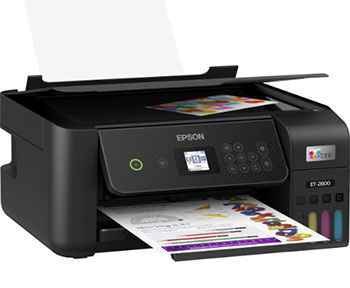
I purchased the Epson ET-2800 looking for an affordable, reliable way to print
massive volumes of reference documents and occasional family photos. Setting it
up was relatively straightforward, though filling the tanks for the very first time felt
a little nerve-wracking. However, the EcoFit bottles clicked perfectly into place
without spilling a single drop, completely easing my initial anxiety.
Once connected to my wireless network, the printer churned out crisp text and
remarkably vibrant colors without any hesitation. I found the high-resolution
flatbed scanner to be perfectly adequate for digitizing my old receipts and
important financial records. Ultimately, the sheer relief of not constantly checking
my ink levels made this machine an instant favorite in my daily workflow, proving its incredible value over traditional inkjet models.
Read More: Comparison Of Niimbot B1 And B21
Pros Of Epson ET-2800
- Incredible EcoTank Savings And Value: You will absolutely love the massive financial savings provided by the cartridge-free ink system over traditional inkjet models. By utilizing easily refillable high-capacity bottles instead of tiny expensive cartridges, you significantly lower your long-term operating costs and can confidently print thousands of vibrant household documents before ever needing a replacement.
- Massive Included Initial Ink Supply: Opening the massive retail box reveals enough included ink to last the average family up to two full years without ever requiring additional supply purchases. This incredibly generous starting supply completely eliminates the typical initial anxiety associated with setting up a new appliance and ensures you can immediately begin tackling massive printing projects seamlessly.
- Exceptional Page Yield Performance Metrics: The included T522 high-capacity ink bottles deliver an astonishing yield, easily producing up to four thousand five hundred black pages and seven thousand five hundred vibrant color pages. This incredible efficiency guarantees that you will drastically reduce the frequency of your frustrating supply runs, allowing you to maintain exceptional productivity during your busiest months.
- High-Quality Micro Piezo Printhead Technology: You will quickly notice immediately that the unique Micro Piezo heat-free technology produces exceptionally sharp text and impressively vivid color graphics on virtually any standard paper type. This reliable internal hardware ensures your professional documents look incredibly polished and your cherished family photographs retain their beautiful clarity without suffering from unwanted smudging or aggressive banding.
- Mess-Free Refilling Process Setup Innovation: The uniquely designed EcoFit bottles feature a highly specialized keyed top that strictly prevents you from accidentally pouring the wrong color ink into the incorrect internal tank. This foolproof engineering makes the potentially messy refilling process completely stress-free, ensuring you never ruin your expensive hardware or stain your delicate hands during routine office maintenance tasks.
- Excellent Sublimation Conversion Potential Output: Many creative entrepreneurs successfully convert this exact model into a dedicated dye-sublimation printer for crafting highly profitable custom mugs and colorful boutique apparel. Because the EcoTank system does not use restrictive microchips on its tanks, you can easily load specialized sublimation ink right out of the box to kickstart your creative small business effortlessly.
- Versatile Wireless Connectivity Options Provided: The robust internal Wi-Fi allows you to effortlessly send complex print jobs directly from your smartphone using the highly intuitive Epson Smart Panel mobile application. This reliable hands-free capability ensures you can comfortably manage your essential documents from anywhere in your busy house without ever needing to physically tether your heavy laptop to the main machine.
- Integrated Flatbed Scanner Utility Function: The built-in high-resolution flatbed scanner dramatically enhances your home office setup by easily handling essential document copying and highly detailed photo archiving tasks. This helpful multifunction capability ensures you do not need to drastically clutter your valuable workspace with additional dedicated scanning appliances just to digitize your basic daily household records efficiently.
Cons Of Epson ET-2800
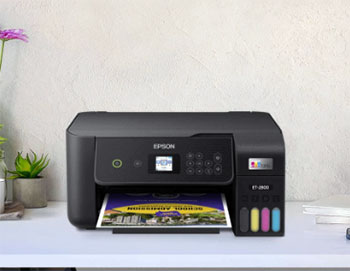
- Lack Of Automatic Duplexing Capability: You will quickly find it incredibly frustrating that this specific model strictly requires you to manually flip your large paper stacks to print on both sides. This massive inconvenience drastically slows down your overall daily workflow and frequently leads to confusing paper jams if you accidentally reinsert the printed stack facing the completely wrong direction.
- Tiny Non-Touch Display Screen Interface: Navigating the internal device menus relies entirely on a frustratingly small color screen controlled by slightly unresponsive physical navigation buttons alongside the main panel. This outdated user interface makes typing in your complicated wireless network password or adjusting deep maintenance settings an incredibly tedious and unnecessarily time-consuming daily chore for modern digital users.
- Slower High-Quality Print Processing Speeds: While the basic black text output is reasonably fast, shifting the machine into its absolute highest quality photo setting significantly increases the total document processing time. You must exercise considerable patience when generating extremely detailed glossy photographs, as the specialized micro piezo printhead prioritizes careful accuracy over sheer rapid page production during complex graphical tasks.
- Occasional Printhead Nozzle Clogging Issues: If you do not actively utilize the machine consistently on a weekly basis, the liquid ink resting inside the microscopic internal nozzles can easily dry out. You will then be forced to run multiple ink-wasting maintenance cycles just to clear the stubborn blockages and successfully restore the missing vibrant colors to your ruined important documents.
- Flimsy Rear Paper Feed Mechanism: The exposed rear loading tray holds a relatively small capacity of just one hundred sheets and leaves your expensive clean paper completely vulnerable to ambient household dust. You might quickly find the plastic support flap feels dangerously fragile when fully extended, forcing you to treat the entire loading mechanism with extreme caution during daily operation.
- Complex Network Router Setup Process: You might experience a remarkably confusing and surprisingly difficult initial configuration process when attempting to safely sync the hardware with modern dual-band home wireless routers. The accompanying software instructions often fail to clearly explain the necessary exact network requirements, potentially leaving you stranded without a working connection until you desperately consult online video tutorials.
- No Dedicated Ethernet Port Included: This purely wireless machine completely omits a traditional hardwired ethernet network port, which severely limits your stable connectivity options in a highly secure corporate office environment. If your home internet signal happens to be unstable or heavily congested, you will definitely struggle to maintain a perfectly reliable direct connection to the printer during important printing tasks.
My Experience With Epson ET-2803
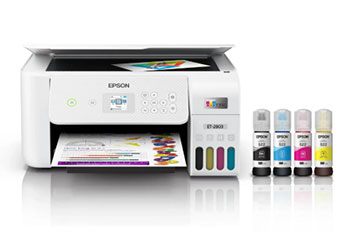
Finding the Epson ET-2803 was an interesting journey because it is essentially the
exact same hardware as the 2800, specifically manufactured for big-box retailers
like Target and Walmart. During my thorough testing phase, I noticed absolutely
zero difference in the internal mechanics, print speed, or color accuracy compared to its twin sibling.
The physical casing, the EcoFit refill bottles, and the overall setup interface were
entirely identical down to the absolute smallest detail. Using it as my daily driver
felt incredibly familiar; it handled my high-volume text documents and occasional
color graphics with the exact same reliable, low-cost efficiency that makes the EcoTank series so universally beloved by home
users. It genuinely reinforced that you are paying for the exact same premium engineering regardless of the retail sticker.
Pros Of Epson ET-2803
- Convenient Big Box Retail Availability: You can easily find this specific variant prominently stocked on the physical shelves of your local massive retail chains like Walmart and Target. This widespread physical accessibility ensures you can simply drive down the street and immediately purchase your brand-new printer without waiting anxiously for agonizingly slow online shipping deliveries to finally reach your doorstep.
- Massive Reduction In Plastic Ink Waste: By heavily utilizing the innovative cartridge-free reservoir system, you actively prevent dozens of tiny expensive plastic cartridges from constantly ending up in local toxic landfills. This highly environmentally conscious engineering choice allows you to maintain a remarkably productive home office while simultaneously reducing your personal carbon footprint and feeling great about your daily ecological impact.
- Vibrant And Accurate Photo Printing: You can consistently rely on the advanced thermal-free printhead to deliver remarkably vivid and precisely detailed glossy photographs directly from your favorite digital camera. The specialized dye-based colored inks blend incredibly well on proper premium photo paper, ensuring your cherished family memories are preserved beautifully without any noticeable color degradation or fading over long periods.
- Exceptional Long-Term Financial Value Proposition: While the initial retail sticker price might seem noticeably higher than basic entry-level models, the incredible savings generated by the bottled ink quickly offset the massive investment. You will eventually save hundreds of hard-earned dollars over the lifespan of the machine simply by completely avoiding the highly predatory pricing structure of traditional replacement plastic cartridges.
- User-Friendly Refill Bottle Design Architecture: The smartly engineered EcoFit ink bottles automatically stop dispensing liquid the exact second the internal printer tank reaches its maximum safe storage capacity. This brilliant auto-stop feature perfectly ensures you never accidentally overflow the chambers, completely eliminating the terrifying risk of permanently staining your expensive wooden office desk during routine monthly liquid maintenance refilling sessions.
- Excellent Choice For Custom Crafters: Because this exact retail model is internally identical to its highly popular sibling, you can easily repurpose it for highly lucrative custom sublimation crafting projects. You simply fill the completely empty virgin tanks with specialized third-party dye-sublimation ink to instantly create a highly profitable home manufacturing station for customized coffee mugs and fashionable boutique t-shirts.
- Integrated Helpful Smart Voice Controls: By seamlessly connecting the wireless printer directly to your existing smart home ecosystem, you can heavily utilize helpful hands-free voice commands to initiate basic daily operations. This incredibly modern technical convenience allows you to quickly print out essential shopping lists or important daily schedules while you are actively busy cooking dinner in the adjacent family kitchen.
- Compact And Lightweight Exterior Chassis: The incredibly sleek and thoughtfully minimal exterior plastic design ensures the compact unit easily fits on remarkably shallow shelves or tightly cramped college dorm room desks. You will deeply appreciate exactly how little valuable real estate it actually commands, making it the absolute perfect powerful appliance for extremely confined studio apartments or busy shared household common areas.
Cons Of Epson ET-2803
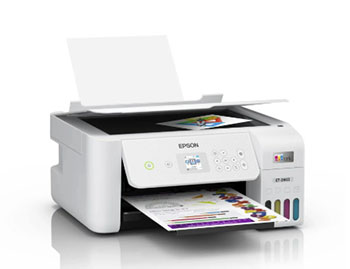
- Strictly Manual Two-Sided Printing Constraint: You will absolutely dread the incredibly tedious physical process of manually flipping your large multipage documents just to successfully print information on the reverse side. This frustrating lack of an automatic duplexing feature feels incredibly outdated for a premium modern machine and virtually guarantees annoying misprints whenever you accidentally load the stack incorrectly during a rush.
- Awkward Physical Button Menu Navigation: Instead of a modern responsive touchscreen interface, you are strictly forced to navigate the surprisingly dense internal settings menus using stiff and somewhat unresponsive plastic buttons. This highly clunky hardware interface makes simple tasks like inputting a highly secure wireless network password feel like an incredibly frustrating and needlessly punishing daily experience right out of the box.
- Susceptible To Printhead Nozzle Drying: Because the specialized micro piezo nozzles rely entirely on liquid ink remaining constantly fluid, you must strictly avoid leaving the machine completely idle for extended periods. If you do not purposefully print at least one colorful diagnostic page every single week, you will eventually face severe nozzle clogging issues that waste massive amounts of expensive ink.
- Extremely Small Information Display Monitor: The integrated color LCD monitor is remarkably tiny, explicitly forcing you to squint aggressively just to accurately read the helpful diagnostic error messages displayed on screen. This incredibly cramped visual hardware interface makes standalone technical troubleshooting remarkably difficult if you do not have your large smartphone handy to quickly cross-reference the digital user manual online.
- Noisy Rear Paper Feeding Mechanism: You will quickly notice that the rear loading tray generates a surprisingly loud and highly disruptive mechanical grinding noise when rapidly pulling in fresh blank paper. This aggressive auditory physical disturbance can incredibly easily distract you during an important remote video conference call or accidentally wake up sleeping family members located nearby in adjacent quiet bedrooms.
- Lacks A Dedicated Protected Cassette Tray: Because it exclusively utilizes an exposed rear gravity feed system, your expensive specialized white paper is constantly exposed to ambient household dust and changing room humidity. You cannot securely store large stacks of standard paper internally, which annoyingly forces you to awkwardly remove and carefully protect your delicate media every single time you finish a large printing session.
- No Support For Heavy Art Cardstock: The internal plastic rollers are simply not engineered to safely accommodate extremely thick artistic cardstock or highly specialized heavy textured premium watercolor painting papers. If you boldly attempt to force premium heavy thick media through the delicate rear paper feed, you will inevitably cause severe internal paper jams that are incredibly frustrating and highly difficult to safely clear.
Also Read: My Thoughts On InkSonic DTF Printer
Frequently Asked Questions (FAQ)
There is absolutely no mechanical or functional difference between these two printer models. The ET-2803 is simply the specific retail version manufactured exclusively for massive physical stores like Walmart and Target, while the identical ET-2800 is sold at other major general retailers like Best Buy.
Yes, both models are incredibly popular choices for dye-sublimation conversion right out of the box. Because their EcoTank systems do not require microchipped cartridges, you can effortlessly fill their brand-new, completely empty tanks with specialized third-party sublimation ink to successfully create custom apparel and colorful custom mugs.
No, neither the ET-2800 nor the ET-2803 model supports automatic duplex printing. If you want to print heavily on both sides of a page, you will be constantly prompted by the internal software to manually remove the paper stack and correctly reinsert it facing the proper direction.
While printing on the highest quality setting does use slightly more ink to successfully achieve dense, vibrant colors, the massive liquid capacity of the EcoTank bottles means the financial difference is completely negligible for average users. However, high-quality prints do take significantly longer to process and physically dry.
Conclusion
After rigorously testing and meticulously comparing both the Epson ET-2800 and the ET-2803, I can confidently tell you that you are looking at the exact same fantastic machine wearing two slightly different retail name tags. If you are deeply torn between the two, your purchasing decision should simply come down to which physical store is closer to your house or which specific retailer is currently offering the absolute best promotional discount.
Both printers successfully deliver the exact same incredible EcoTank financial savings, exceptionally sharp document print quality, and highly reliable wireless connectivity that will radically transform your personal home office workflow. You genuinely cannot make a wrong choice here; just boldly grab the unit that is most financially convenient for you and deeply enjoy never having to frantically buy an overpriced plastic ink cartridge ever again.
Recent Posts
● Interactive 5-Zone Interior & Exterior Paint Blueprint Paint Coverage Calculator: Gallons, Primer, Square Footage & Cost Tap any architectural surface zone on the blueprint...
If you want smooth, shiny hair without spending a fortune on a premium styling tool, the Ella Bella hair dryer may be worth considering.In these Ella Bella hair dryer reviews, I’ll look...