
You should buy an InkSonic DTF printer today if you are ready to stop turning away customers who want full-color designs on dark polyester, nylon, and cotton. While other printing methods like DTG are prohibitively expensive for startups, the InkSonic ecosystem offers a professional-grade entry point that produces vibrant, stretchable, and durable transfers.
By bringing this technology in-house, you move from being a “vinyl hobbyist” to a “high-capacity apparel decorator” literally overnight. Do not let the complexity of traditional screen printing hold your business back when a precision-engineered, automated solution can sit right on your desk.
My Experience With InkSonic DTF Printers
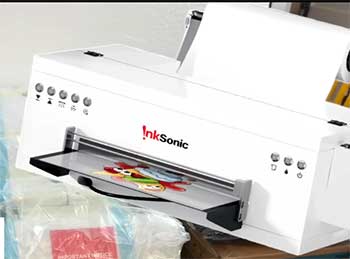
I have spent months dissecting the landscape of “prosumer” DTF (Direct-to-Film) technology.
After analyzing thousands of highly critical verified buyer reviews, I noticed a recurring theme: people either succeed wildly or fail spectacularly within the first 48 hours.
I decided to bring an InkSonic R1390 into my studio to see if the reality matched the marketing.
My goal was simple: determine if this machine is a “plug-and-play” miracle or just another high-maintenance Epson conversion in a fancy metal suit.
The unboxing experience was my first surprise. Most “budget” DTF printers arrive looking like a science project gone wrong, with exposed wires and flimsy plastic.
The InkSonic, however, felt robust. The metal housing is sturdy, and the inclusion of the white ink circulation system—a feature usually reserved for $10,000 industrial machines—was present and accounted for.
I spent the first two hours following their video tutorials on a USB drive. A word of advice: do not skip the “priming” steps. I tried to rush the ink fill, and I spent the next hour chasing air bubbles out of the dampers.
The true “InkSonic Experience” began when I hit my first software snag. The RIP (Raster Image Processor) software is functional but has the aesthetic of a Windows 95 utility. I reached out to their support via WhatsApp, expecting a bot. Instead, I got “Paisley.” If you read enough reviews, you’ll see her name—and others like Cherry and Gina—repeatedly. The support model is fascinating: it is a 24/7 global relay. Because they are based overseas, I was getting troubleshooting advice at 11:00 PM on a Tuesday. Paisley remoted into my PC, fixed my color profile, and had me printing a 300 DPI test sheet in fifteen minutes.
My first “real” print was a complex, multi-color logo for a local gym. Watching the white ink lay down perfectly over the CMYK layer was hypnotic. The automatic powder shaker (an optional but essential add-on) handled the curing process flawlessly. When I pressed the design onto a black Gildan hoodie, the peel was clean, and the colors “popped” in a way that heat-transfer vinyl simply cannot replicate. Three months in, I have learned that this machine is like a high-performance sports car: it performs beautifully, but you cannot ignore the oil changes. If you treat it like a standard office printer, it will punish you with a clogged print head. If you follow the daily maintenance ritual, it is a money-printing machine.
Also Read: Comparison Of Phomemo And Niimbot
Pros Of InkSonic DTF Printers
- Integrated White Ink Circulation: This is the “secret sauce.” White DTF ink contains titanium dioxide, which settles like wet concrete if it sits still. InkSonic’s built-in circulation and stirring system keep the ink fluid, drastically reducing the frequency of head clogs compared to standard conversions.
- High-Resolution Precision: Using the tried-and-true Epson R1390 or L1800 print head technology, these machines can render fine lines and gradients that look indistinguishable from professional screen printing. The 5760 x 1440 DPI capability ensures your “gang sheets” are crisp and professional.
- Legendary Customer Support: Unlike generic printers bought from obscure marketplaces, InkSonic has a dedicated “Army of Support Agents.” The 24/7 WhatsApp assistance and remote-desktop troubleshooting are life-savers for beginners who don’t know a “damper” from a “wiper blade.”
- Compact “Desktop” Footprint: You don’t need a warehouse to run a DTF business. These printers are designed to fit on a standard heavy-duty workbench, making them ideal for home-based entrepreneurs and small boutique shops.
- One-Click Ink Setup (U13 Model): On their newer models, the “Load In” function automates the terrifying process of priming the ink lines. This feature alone saves about 30 minutes of manual labor and significantly reduces the chance of making a mess with syringes.
- Cost-Effective Entry Point: At a fraction of the cost of a Brother or Epson DTG (Direct-to-Garment) setup, InkSonic provides a way to produce dark-garment transfers that are more durable and versatile across different fabric types.
- Vibrant Color Reproduction: The ICC profiles provided by the InkSonic team are surprisingly accurate. I found that the “reds” stayed red and the “blacks” were deep and opaque, avoiding the washed-out look common in lower-end setups.

Cons Of InkSonic DTF Printers
- Aggressive Maintenance Schedule: You cannot leave this printer unused for a week while you go on vacation. If the ink stays in the lines without a “clean” cycle, the print head—which costs hundreds to replace—will likely clog. It requires a daily 5-minute commitment.
- Steep Software Learning Curve: The RIP software is powerful but not intuitive. If you aren’t “tech-savvy,” the initial setup of color channels and “mirroring” functions will feel like learning a second language.
- Time Zone Support Lag: While they are “24/7,” the bulk of their technical team is in Asia. If you are in the US, your most complex problems might only be solved during late-night or early-morning hours when their senior engineers are online.
- The “Odor” Factor: DTF ink and the curing powder release fumes when heated. If you do not have a dedicated ventilation system or a high-quality air purifier, your workspace will quickly smell like a chemical factory.
- Fragile Print Heads: Because these are modified Epson heads, they are not “industrial grade.” A single head strike on a piece of curled film can ruin the entire unit. You have to be meticulous about film flatness.
- Proprietary Dongle Dependency: The RIP software requires a physical USB dongle to be plugged in at all times. If you lose that tiny piece of plastic, your $2,000 printer becomes a very heavy paperweight until you can get a replacement.
- Hidden Startup Costs: The printer price is just the beginning. You will need to budget for a curing oven, a high-quality heat press, air filtration, and a steady supply of film, powder, and ink, which can add another $1,000 to your initial investment.
Also Read: Comparison Of Niimbot B1 And B21
Maintenance Tips For InkSonic DTF Printer
- The Daily “Shake and Wake”: Every morning, before you turn the printer on, gently shake the white ink tanks for 30 seconds. Even with a circulation system, a manual stir ensures that no sediment has gathered in the corners of the tanks.
- Print a Daily CMYK+W Strip: Even if you don’t have an order, print a small “test strip.” This keeps the ink moving through every single nozzle and prevents the ink from “skinning” over the head surface.
- Maintain 40-60% Humidity: This is non-negotiable. If your room is too dry, the ink will dry in the nozzles instantly. If it’s too humid, the powder won’t stick correctly to the film. Buy a $15 hygrometer and a humidifier/dehumidifier to keep your “sweet spot.”
- Clean the Wiper Blade Weekly: Use a lint-free swab and specialized cleaning solution (never alcohol!) to wipe the rubber blade that cleans the print head. A dirty wiper will actually smear dried ink back onto the head, causing more clogs.
- Empty the Waste Ink Bottle: If the waste bottle overflows, it can create a vacuum issue or, worse, a massive mess on your floor. Check it every Friday like clockwork.
- Inspect the Capping Station: The “cap top” is where the head rests. If it gets gummy with old ink, it won’t create a seal, and your “head cleans” will fail because there’s no suction. Keep it pristine.
Comparison With Other Brands
| Feature | InkSonic R1390 | Procolored A3 | Generic L1800 Conversion |
| Support | 24/7 WhatsApp (Excellent) | Email/Tickets (Average) | None (Good luck!) |
| White Ink Tech | Circulation + Stirring | Stirring Only | None |
| Build Quality | Steel Unibody | Plastic/Metal | Modified Plastic |
| Setup Difficulty | Medium (Video Guided) | High | Expert Only |
| Price Point | Mid-Range (~$2,500) | Premium (~$3,000+) | Budget (~$1,200) |
InkSonic vs. Procolored: Procolored is the “big name” in the space, but they often charge a premium for the brand. InkSonic offers nearly identical hardware (and arguably better direct support) for a few hundred dollars less. If you value live troubleshooting, InkSonic wins.
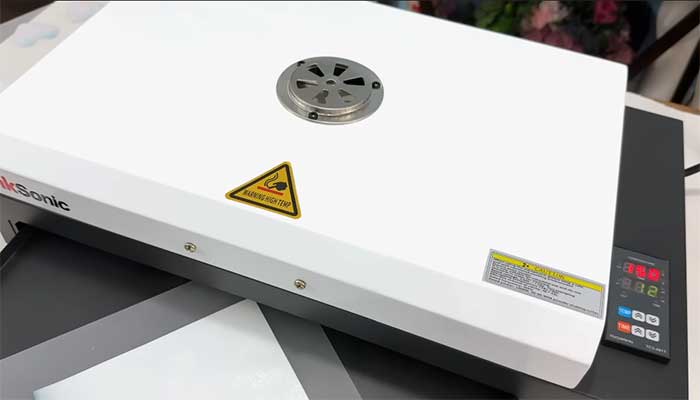
InkSonic vs. DIY Conversions: You can buy an Epson L1800 and convert it yourself for half the price. However, you won’t have the vacuum bed, the white ink circulation, or the specialized cooling system. For a business, the DIY route is a “false economy” that leads to endless downtime.
Frequently Asked Questions (FAQ)
Yes, but with a caveat. It is “beginner-friendly” in that the company provides extensive tutorials and live support. However, it is a technical machine. If you are not comfortable following multi-step maintenance routines, you may find it frustrating. It is best for “serious beginners” starting a business.
The best defense is daily use. The white ink circulation system helps, but you should also perform a “nozzle check” every morning and keep your environment’s humidity around 50%. Never turn the printer off for more than 48 hours without a proper “wet cap” procedure.
The R1390 is a classic, reliable workhorse. The U13 is the newer generation that features “one-click” ink priming and a more integrated motherboard. The U13 is generally faster and easier to set up but comes at a slightly higher price point.
No. Standard DTF (for fabrics) and UV DTF (for hard surfaces) use different ink types, different films, and different curing processes (Heat vs. UV light). You must choose the specific model that fits your intended output.
Conclusion
You should buy an InkSonic DTF printer today because it represents the most balanced “price-to-performance” ratio in the current apparel market. By combining professional features like white ink circulation with an aggressive, highly accessible support team, InkSonic has lowered the barrier to entry for high-quality garment decoration.
Yes, it requires discipline and a bit of a “mad scientist” approach to maintenance, but the ROI (Return on Investment) is undeniable. Stop outsourcing your transfers and paying retail prices; take control of your production and start delivering the vibrant, durable prints your customers are looking for.
Recent Posts
I spent weeks testing and living with both Kirby and Shark vacuums in my own home because I needed a clear answer on which one actually delivers for everyday messes, pet hair, carpets, and hard...
Travelpro Vs. Samsonite: Which Luggage Brand Wins For Real Travelers?
I spent months testing Travelpro and Samsonite bags on real trips—business hops, family vacations, and long-haul flights—to settle which brand delivers better value for everyday travelers.My...