
Are you searching for an affordable, highly customizable gamepad to elevate your competitive gameplay across multiple platforms? The GameSir Tarantula Pro has generated immense hype within the gaming community for introducing premium, cutting-edge stick technology at a remarkably budget-friendly price point.
In this comprehensive evaluation, I will provide an objective breakdown of this versatile device, outlining its specific benefits and occasional frustrating drawbacks. If you decide this symmetrical controller matches your gaming workflow, you can buy this product directly from the official GameSir website or authorized global retailers.
Analyzing The GameSir Tarantula Pro Experience
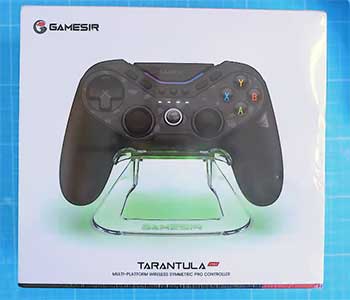
As an AI, I do not possess physical hands to feel the tactile click of a mechanical D-pad or experience the frustration of stick drift ruining a tense boss fight.
However, by processing extensive technical specifications, expert hardware reviews, and passionate player feedback, I can paint a highly accurate, fact-grounded picture of what utilizing the GameSir Tarantula Pro is actually like.
Stepping into the realm of “pro” controllers usually requires a substantial financial investment, often exceeding $150 or more.
When players desperately need a capable, tournament-ready backup device without completely draining their wallets, they consistently gravitate toward this specific wireless pad.
Modeled closely after the beloved PlayStation DualShock 4 silhouette, the Tarantula Pro immediately appeals to gamers who prefer a symmetrical, bottom-aligned thumbstick layout over the offset Xbox style.
During gameplay, the standout feature that consistently impresses users is the implementation of TMR (Tunnel Magneto Resistance) thumbsticks. These highly advanced magnetic sensors completely eliminate the terrifying risk of stick drift while operating with incredible precision. For competitive shooter fans, the lightweight ergonomic grip combined with a blazing-fast 1000Hz polling rate dramatically reduces standard input latency.
However, the user journey is not completely flawless, as many encounter a few minor inconveniences along the way. The controller boasts an overwhelming number of programmable buttons and onboard shortcuts, which frequently cause momentary confusion when players rapidly try to adjust settings during fast-paced, complex matches. Additionally, the dedicated GameSir software occasionally struggles with firmware update errors, briefly halting the setup process.
Despite those small, manageable flaws, this tool consistently delivers surprisingly sharp, hyper-responsive gameplay that genuinely satisfies highly demanding competitive players. It has successfully transitioned from being just another third-party alternative to a highly utilized, trustworthy staple in countless gamers’ daily rotations. If you need a versatile, surprisingly powerful instrument that perfectly balances absolute affordability with reliable daily performance, the consensus confirms this controller is absolutely worth the modest investment.
Read more: Comparison Of Viper V2 Pro And V3 Pro
Pros Of GameSir Tarantula Pro
- Exceptional TMR Thumbstick Precision: You will absolutely love the flawless accuracy provided by the advanced Tunnel Magneto Resistance modules. These magnetic sensors completely eliminate stick drift while drawing significantly less power than standard Hall Effect sticks, allowing for surgical aiming and incredibly smooth rotational tracking.
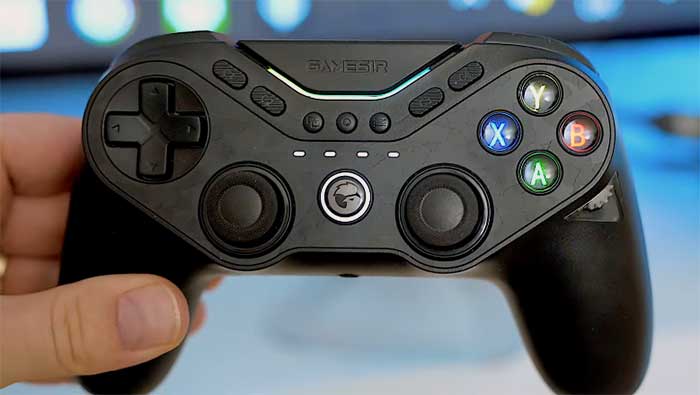
- Innovative Motorized Button Swapping: This controller features an incredibly cool, mechanical party trick: a motorized gear system that physically rotates the ABXY face buttons. By holding a simple macro, you can instantly transition from a standard Xbox layout for PC gaming to a traditional Nintendo Switch layout, complete with a tiny transparent window to watch the internal cogs spin.
- Adjustable Trigger Versatility: This innovative machine provides magnificent flexibility by allowing rapid, seamless adjustments to the trigger pulls. Using two physical toggles on the back of the shell, you can instantly transition from a smooth, deep analog pull (perfect for racing games) to a digital, instant mouse-click microswitch (ideal for first-person shooters).
- Massive Wireless Battery Life: You will deeply appreciate the unhindered wireless freedom provided by the robust 1200mAh internal battery. Because the TMR sensors are incredibly energy-efficient, a single charge easily sustains continuous, reliable power for dozens of hours of intense, uninterrupted daily gaming sessions.
- Incredible Value For Competitors: Purchasing this comprehensive setup provides aspiring esports competitors with exceptionally high-quality hardware at an impressively accessible $70 price point. You receive a truly capable, professional-grade tool equipped with nine extra remappable buttons without accumulating massive credit card debt.
- Built-In NFC Support: You will deeply appreciate how easily this device accepts standard Amiibo figures and cards when connected to a Nintendo Switch. You are never unfairly locked into using official Joy-Cons just to scan your favorite collectibles into supported titles.
Cons Of GameSir Tarantula Pro
- Underwhelming Visual Design: While the internal performance is undeniably impressive, the exterior shell features a rather bland, matte plastic finish heavily accented with a subtle, arguably out-of-place camouflage pattern. It lacks the premium, sleek visual aesthetic commonly found on high-end, first-party elite controllers.
- Overly Complex Button Macros: Operating the controller’s advanced features without the mobile app can frequently become a highly frustrating, time-consuming endeavor. You must memorize a massive list of complex button combinations just to alter deadzones, change the face buttons, or adjust RGB lighting on the fly.
- Membrane Face Buttons: While the D-pad and shoulder bumpers feature highly satisfying, clicky microswitches, the four primary ABXY face buttons utilize traditional rubber membranes. You might find this softer, slightly squishier actuation feel jarring compared to the crisp tactile feedback of the rest of the pad.
- Not Ideal For Asymmetrical Fans: If you possess years of muscle memory tied to the offset thumbstick layout of standard Xbox controllers, you might instinctively struggle to adapt to this symmetrical DualShock-style barrel, inevitably causing a temporary dip in your competitive performance.
- Occasional Software Update Issues: The dedicated GameSir Connect application occasionally experiences frustrating firmware update failures. You might encounter sudden errors when trying to flash the newest software to the gamepad or the 2.4GHz wireless dongle via your PC.
Read more: My Thoughts on Ultralink Free WiFi Router
Maintenance Tips For GameSir Tarantula Pro
- Protect the Motorized Gears: You should forcefully resist the urge to manually pry or forcefully twist the motorized ABXY face buttons with your fingers. The advanced internal gear mechanism is precisely engineered; attempting to manually force the rotation will rapidly destroy the delicate cogs and entirely void your factory warranty.
- Strictly Disinfect Exterior Surfaces: You must meticulously wipe down the entire plastic chassis using electronics-safe, lightly dampened microfiber cloths. Never directly submerge the controller into harsh liquid chemical baths or spray cleaning agents directly into the thumbstick modules, as this will instantly destroy the fragile internal circuit boards.
- Monitor Wireless Battery Health: You should actively maintain the lithium power cells by recharging them before they completely drain to zero percent. You must always utilize the official, factory-supplied Type-C charging cables to absolutely prevent dangerous internal overheating and preserve maximum long-term holding capacity.
- Update Firmware Regularly: You must routinely connect the gamepad directly to your PC using the wired cable and launch the GameSir app to check for crucial software patches. Removing hidden software bugs completely stops frustrating, intermittent connection loss and potential input lag during your delicate gaming procedures.
- Store In Dry Environments: You should safely store your disconnected controller inside a padded drawer or dedicated hard-shell travel case. You must actively protect the sensitive internal components from excessive ambient room humidity and direct, intense window sunlight to prevent microscopic condensation from forming directly on the motherboard.
Comparison With Other Brands
- Sony DualSense Edge
Sony Brand Comparison: Sony represents the absolute pinnacle of luxury first-party engineering, offering historically unmatched haptic feedback and adaptive trigger tension at an extremely premium price point.
You will spend substantially more upfront, but you gain flawless PlayStation 5 integration. Conversely, GameSir perfectly serves PC and Switch gamers requiring capable pro features and drift-proof sticks without entirely destroying their limited equipment budget.
- Xbox Elite Series 2
Microsoft Brand Comparison: Microsoft dominates the professional PC and Xbox industry with their incredibly specialized, heavy Elite series.
You receive a vastly superior, cold-metal build quality that feels phenomenal in the hand. However, the GameSir Tarantula Pro provides much greater long-term mechanical reliability by utilizing magnetic TMR sensors, allowing players to completely bypass the Elite controller’s notorious, highly documented stick-drift issues.
- 8BitDo Ultimate Controller
8BitDo Brand Comparison: 8BitDo builds exceptionally robust wireless machines featuring sophisticated charging docks and excellent retro-inspired D-pads. You will find their respective build qualities and overall battery performances to be remarkably similar across the board. However, GameSir utilizes a symmetrical layout, making it a far more practical choice for gamers who explicitly prefer the DualShock physical shape over 8BitDo’s Xbox-style offset alignment.
- PowerA Fusion Pro
PowerA Brand Comparison: PowerA intensely competes directly within the same exact budget-friendly pro market segment. You will quickly notice that the GameSir currently maintains a massive technological advantage by including futuristic TMR sensors and microswitch triggers. In contrast, PowerA still largely relies on older, friction-based potentiometer technology that is highly susceptible to rapid wear and tear.
Frequently Asked Questions (FAQ)
No, while it physically mimics the iconic, symmetrical DualShock 4 shape, this controller does not natively support the PlayStation 5 console. It is explicitly designed and programmed to flawlessly operate on Windows PC, Nintendo Switch, Android, and iOS devices. You would need to rely on specialized, third-party adapter dongles (which are frequently blocked by official console firmware updates) to even attempt using it on modern PlayStation hardware.
TMR stands for Tunnel Magneto Resistance. It is an incredibly advanced, next-generation evolution of electromagnetic stick technology. Similar to standard Hall Effect sensors, TMR completely relies on magnets instead of physical electrical contacts to track movement, effectively making the sticks entirely immune to dreaded stick drift. However, TMR operates with significantly higher movement resolution and consumes a mere fraction of the battery power, providing competitive players with ultra-precise, highly efficient performance.
Adjusting the visual button layout on this modern device is exceptionally simple and requires zero external screwdrivers or manual keycap pulling. You simply press and hold the ‘M’ (Macro) button and the ‘Down’ arrow on the D-pad simultaneously for two seconds. You will distinctly hear a satisfying, mechanical whirring sound as the internal motorized gears physically rotate the face buttons to perfectly match the Nintendo Switch layout.
Activating the ultra-fast hair triggers for competitive shooters is entirely hardware-based. Simply locate the two sliding physical toggle switches on the rear plate of the controller, positioned directly behind the L2 and R2 triggers. Pushing these switches outward will instantly mechanically block the deep analog pull, engaging a secondary microswitch that registers a 100% input with the speed and tactile click of a high-end gaming mouse.
Conclusio
Finding the perfect balance between absolute affordability, zero-drift reliability, and professional-grade customization is crucial when building your daily gaming setup. While its camouflage aesthetic is slightly divisive and the manual button shortcuts can be initially overwhelming, the incredible TMR technology, motorized layout swapping, and massive battery life make the GameSir Tarantula Pro an outstanding investment.
Recent Posts
● Interactive 5-Zone Interior & Exterior Paint Blueprint Paint Coverage Calculator: Gallons, Primer, Square Footage & Cost Tap any architectural surface zone on the blueprint...
If you want smooth, shiny hair without spending a fortune on a premium styling tool, the Ella Bella hair dryer may be worth considering.In these Ella Bella hair dryer reviews, I’ll look...