
When I first unboxed both of these premium gaming peripherals, I immediately recognized that choosing between them would be incredibly difficult. My primary goal in this article is to compare their designs, sensor capabilities, and daily performance metrics to help determine the ultimate winner. Both mice command a high price tag and promise elite-level performance, but their distinct shapes cater to completely different grip preferences. I have spent extensive time testing both models in intense competitive environments, and I am ready to share my definitive verdict.
A Brief Comparison Table
| Feature | Razer Viper V3 Pro | Razer DeathAdder V3 Pro |
| Shape | Right-handed symmetrical | Right-handed ergonomic |
| Sensor | Focus Pro 35K Gen-2 | Focus Pro 30K |
| Weight | 54 grams | 63 grams |
| Maximum DPI | 35,000 | 30,000 |
| Polling Rate | Up to 8000 Hz (Dongle included) | Up to 8000 Hz (Dongle sold separately) |
| Battery Life | Up to 95 hours (1000 Hz) | Up to 90 hours (1000 Hz) |
| Switches | Optical Gen-3 (90-million clicks) | Optical Gen-3 (90-million clicks) |
| Dimensions | 127.1 x 63.9 x 39.9 mm | 128.0 x 68.0 x 44.0 mm |
My Experience With Razer Viper V3 Pro
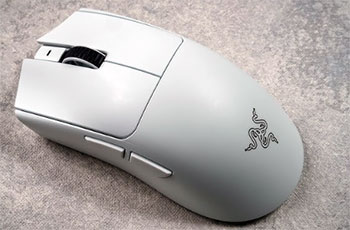
I started using this symmetrical flagship expecting top-tier tracking, and it genuinely blew my expectations out of the water.
The moment I loaded into my first competitive match, the lightweight chassis felt like an absolute extension of my hand.
I immediately noticed how effortless the glide was, allowing me to hit flick shots that I normally struggle with.
The smooth touch coating felt fantastic against my skin, giving me a secure grip without causing my fingers to sweat excessively.
I tested the eight-thousand hertz polling rate extensively using the included wireless dongle, and the responsiveness felt surreal.
My crosshair movements felt instantaneously mapped to the screen, leaving zero room for input lag excuses. However, I did notice the battery draining significantly faster when pushing the hardware to its absolute limit.
Despite the battery trade-off at higher polling rates, my overall time with this mouse was phenomenal. I never experienced any sensor spin-outs, and the incredibly crisp click actuation gave me immense confidence during chaotic gunfights. It quickly became my go-to choice for fast-paced shooters.
Read More: Comparison Of Viper V2 Pro And V3 Pro
Pros Of Razer Viper V3 Pro
- Incredibly Lightweight Construction: Weighing merely fifty-four grams, this symmetrical gaming mouse provides an effortless glide across your chosen surface. You will notice a drastic reduction in wrist fatigue during marathon sessions, allowing for lightning-fast flick shots without compromising the structural integrity or the premium feel of the device itself, ensuring peak performance.
- Top-Tier Optical Sensor: The cutting-edge Focus Pro 35K optical sensor delivers flawless tracking accuracy and precision for demanding competitive titles. You gain total confidence in your aim, as the technology completely eliminates spin-outs and jitter, translating your physical hand movements into the game engine with absolute pixel-perfect perfection every single time.
- Included HyperPolling Wireless Dongle: You receive the advanced eight-thousand hertz wireless receiver right out of the box, saving you from purchasing additional accessories. This incredibly high polling rate minimizes input latency to virtually zero, offering an exceptionally smooth and responsive tracking experience that professional esports players demand for top-tier tournament play.
- Refined Symmetrical Shape: The universally appealing ambidextrous silhouette accommodates various grip styles, especially claw and fingertip grips. You will find the slight adjustments to the side curvature and button height offer a highly secure hold, maximizing your overall control and comfort during highly intense, high-stakes multiplayer gaming encounters across your favorite games.
- Outstanding Battery Efficiency: Despite packing top-of-the-line internal hardware, this mouse delivers up to ninety-five hours of continuous usage on a standard one-thousand hertz polling rate. You can game for several weeks on a single charge, entirely eliminating battery anxiety and the constant need to plug in a restrictive charging cable.
- Premium Smooth Touch Coating: The exterior shell features a highly refined, grippy texture that repels sweat and prevents accidental slipping. You will maintain a firm, confident grasp even in warmer environments, making additional aftermarket grip tape largely unnecessary for most standard setups and ensuring consistent performance throughout your lengthiest play sessions.
- Durable Optical Mouse Switches: Utilizing the third generation of optical switch technology, the primary buttons guarantee extremely rapid actuation without any annoying double-clicking issues. You can rely on the phenomenal ninety-million click lifespan to survive years of aggressive usage, providing a satisfyingly crisp and remarkably tactile click response every single time.
- Flawless Glide Experience: The factory-installed virgin-grade polytetrafluoroethylene mouse feet provide an incredibly buttery and completely frictionless movement across any surface. You will execute micro-adjustments with zero stuttering or unwanted friction, dramatically enhancing your overall mechanical precision when tracking heavily evasive targets in incredibly fast-paced competitive arena shooter video game titles.
Cons Of Razer Viper V3 Pro
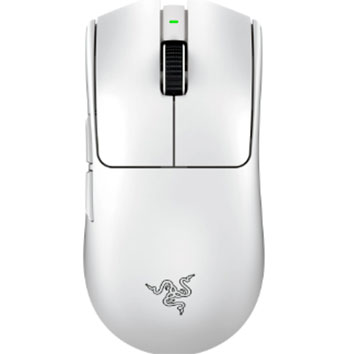
- Premium Price Point: Retailing at a notably high cost, this flagship model demands a significant financial investment from your wallet. You might find it exceedingly difficult to justify the expense if you only play casual titles, as the top-tier technological advancements are strictly tailored toward hyper-competitive esports enthusiasts and dedicated professionals.
- Aggressive Battery Drain: While the battery life is excellent at standard settings, utilizing the maximum eight-thousand hertz polling rate depletes the power incredibly fast. You will only get around seventeen hours of continuous usage, forcing you to recharge the device almost daily if you insist on utilizing its maximum performance capabilities.
- Lack Of Bluetooth Connectivity: Designed purely for competitive environments, this device completely omits Bluetooth support in favor of a low-latency connection. You lose the convenient ability to quickly pair the mouse with productivity laptops or secondary tablets, heavily restricting its overall versatility for general daily tasks or seamless multi-device travel setups.
- Symmetrical Shape Discomfort: If you possess heavily pronounced palm grip tendencies, the flatter profile might not provide adequate palm support. You may experience minor cramping or lingering discomfort during extended use, as the shell design heavily prioritizes aggressive claw or fingertip grips over relaxed, full-hand resting postures common in ergonomic models.
- No RGB Lighting Features: In a strict pursuit of weight reduction and battery optimization, the manufacturer entirely removed all aesthetic illumination. You will miss out on the customizable flair that typically matches a vibrant gaming setup, which might disappoint those who heavily prioritize flashy visual themes alongside their high-end peripheral performance.
- Missing Dock Compatibility: Unlike some previous generations, this specific iteration lacks convenient magnetic charging dock support. You must manually plug in the cable whenever the battery runs low, which adds a minor but noticeable layer of friction to your daily desk routine and creates unnecessary wire clutter across your workstation.
- Slightly Louder Click Noise: The implementation of the newest optical switches results in a relatively sharp and loud acoustic profile. You might annoy roommates, family members, or office colleagues in quiet environments, as the distinct snapping sound penetrates easily through thin walls and can become quite distracting during intense rapid-fire clicking sequences.
- Requires Extensive Software Integration: To fully utilize the advanced sensor customization and adjust the exceptionally high polling rates, you must run the proprietary background software constantly. You might experience minor system resource drain or frustrating bloatware annoyances, which heavily detracts from the otherwise beautifully streamlined plug-and-play nature of this premium hardware.
My Experience With Razer DeathAdder V3 Pro
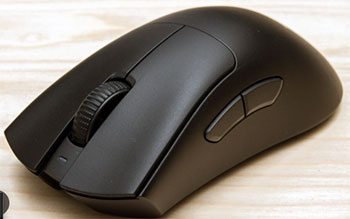
Switching over to this contoured model, I instantly felt a wave of comfort wrap around my palm. The ergonomic slope is masterfully designed, completely filling out my hand and providing a level of support that symmetrical mice simply cannot match. I spent entire weekends grinding through campaigns and multiplayer lobbies, and I never once felt any lingering cramps or wrist stiffness.
I heavily relied on the split key cover design, which made spamming the primary buttons feel incredibly consistent regardless of where my fingers landed. While the sixty-three-gram weight is slightly heavier than its symmetrical counterpart, it still felt remarkably light and nimble on my desk pad. I found my tracking movements to be incredibly stable and beautifully controlled.
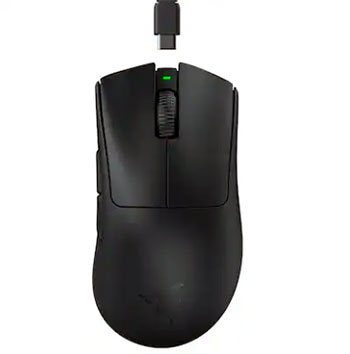
My only minor gripe during testing was the realization that I needed a separate dongle to achieve the maximum polling rate. Nevertheless, playing at the standard one-thousand hertz still yielded a flawless, stutter-free wireless connection. I genuinely appreciate the impeccable build quality and the remarkable sensor precision this device brings to my desktop setup.
Pros Of Razer DeathAdder V3 Pro
- Exceptional Ergonomic Comfort: The expertly sculpted asymmetrical shape naturally contours exactly to the inner curves of your right hand. You will experience phenomenal palm support that significantly minimizes strain, making it an absolute dream for prolonged gaming marathons and relaxed, full-hand grip styles that demand maximum sustained comfort over many hours.
- Remarkable Weight Reduction: Tipping the scales at a mere sixty-three grams, this ergonomic mouse eliminates the bulky feel traditionally associated with larger forms. You can effortlessly glide the device across your mousepad with minimal resistance, ensuring that your tracking remains swift, highly responsive, and completely unhindered by unnecessary internal mass.
- Elite Optical Sensor Precision: Equipped with the highly accurate Focus Pro thirty-thousand optical sensor, you gain an immense competitive advantage in tracking reliability. The device tracks flawlessly across various surfaces, including thick glass, ensuring your crosshair placement remains consistently perfect without any frustrating spin-outs, jitter, or unpredictable acceleration ruining your crucial shots.
- Crisp Optical Switch Reliability: The third-generation optical switches deliver a brilliantly tactile and instantaneous actuation feel upon every single click. You never have to worry about traditional mechanical degradation or frustrating double-click phenomena, as the light-based actuation guarantees incredible durability and a stunning ninety-million click lifespan for intense, long-term competitive gaming.
- Solid Battery Endurance: Operating at the standard polling rate, the internal battery efficiently sustains up to ninety hours of continuous playtime. You can reliably game for extended periods without constantly monitoring your charge levels, allowing for an uninterrupted focus on your gameplay rather than searching frantically for a cumbersome charging cable.
- Split Key Cover Design: The structural separation of the main left and right buttons from the main outer shell dramatically improves the click tactility. You will notice a highly consistent, satisfying tension regardless of where your fingers rest on the buttons, granting you superior confidence during chaotic, high-pressure in-game combat scenarios.
- Flawless Wireless Connectivity: Utilizing the proprietary HyperSpeed wireless technology, you receive an incredibly stable connection that rivals traditional wired alternatives. You will experience zero noticeable latency or signal interference, completely liberating your desk space from messy cables while retaining the exact same lightning-fast response times expected from professional-grade esports peripherals.
- Exceptional Surface Compatibility: The advanced optical sensor technology guarantees incredibly precise tracking on virtually any desk environment, including transparent glass surfaces. You can confidently take this device to various gaming tournaments or unfamiliar LAN setups without constantly worrying about bringing a specialized mousepad just to ensure your crosshair functions correctly.
Cons Of Razer DeathAdder V3 Pro
- Substantial Price Premium: This high-performance mouse carries a rather steep retail price that might heavily strain your gaming budget. You are paying a massive premium for the lightweight construction and top-tier sensor, which may feel entirely unjustified if you strictly play slow-paced, casual games that do not demand elite-level hardware specifications.
- HyperPolling Dongle Sold Separately: Unlike its symmetrical sibling, you must purchase the eight-thousand hertz wireless receiver separately to unlock the maximum polling rate. This additional expense significantly increases the overall investment required, leaving you stuck with standard performance out of the box unless you willingly spend more money on the proprietary upgrade.
- Exclusively Right-Handed Design: The heavily sculpted ergonomic slope completely alienates left-handed gamers from utilizing this exceptional piece of hardware. You must look elsewhere if you rely on your left hand for aiming, as the aggressively contoured thumb groove and flared right side make it physically impossible to hold comfortably in reverse.
- Large Form Factor Limitations: Due to its notably bulky and elongated dimensions, this mouse struggles to accommodate gamers with genuinely small hands. You might find it difficult to securely wrap your fingers around the chassis, leading to a frustratingly unstable grip that severely hinders your overall aiming precision and in-game mechanical control.
- Absence Of Bluetooth Functionality: Dedicated solely to low-latency competitive gaming, this peripheral completely lacks a standard Bluetooth connectivity option. You cannot seamlessly switch between your desktop gaming rig and a work laptop on the go, effectively confining this premium device exclusively to workstations that actively utilize the required wireless USB receiver dongle.
- Zero RGB Illumination Options: The manufacturer actively chose to remove all customizable lighting zones to aggressively reduce the total weight. You will not be able to sync the mouse with your existing illuminated peripherals, stripping away a popular aesthetic feature that many enthusiasts deeply value when designing their ultimate personalized battlestation aesthetic.
- Slightly Hollow Acoustic Feel: Because of the extremely lightweight inner framework, the primary clicks can occasionally produce a subtly hollow resonating sound. You might perceive this acoustic characteristic as slightly less premium compared to denser, heavier mice, though it does not negatively impact the actual physical performance or the switch durability whatsoever.
- Strictly Limited Programmability: With only five customizable buttons available, you possess extremely restricted options for mapping complex in-game macros or utility functions. You will likely struggle in massive multiplayer online titles or complex battle royales that demand an extensive array of easily accessible keybinds located directly on your primary aiming peripheral.
Also Read: My Thoughts On GameSir Tarantula Pro
Frequently Asked Questions (FAQ)
Yes, the symmetrical design and slightly lower profile make it generally easier to control if you have smaller hands. You will find that the reduced height allows for a much more comfortable claw or fingertip grip compared to the distinctly bulkier ergonomic chassis of its right-handed sibling.
You do need the proprietary software to initially customize your DPI stages, adjust lift-off distances, and modify the wireless polling rates. However, both devices feature built-in onboard memory, allowing you to save your preferred configuration directly to the mouse and completely uninstall the background application afterward if desired.
You will absolutely struggle to use the heavily contoured ergonomic shape of the DeathAdder with your left hand. While the Viper features a somewhat ambidextrous physical silhouette, it only includes programmable side buttons on the left edge, making it heavily optimized for right-handed users despite its symmetrical outer shell.
Conclusion
After thoroughly testing both of these remarkable peripherals, my final recommendation ultimately boils down to your specific grip style. I found the Razer Viper V3 Pro to be an absolute powerhouse for highly competitive arena shooters, offering an incredibly lightweight frame and an included high-speed dongle that easily justifies its premium cost. If you utilize a claw or fingertip grip, you will fall in love with its symmetrical perfection.
However, if you prioritize sustained comfort and utilize a relaxed palm grip, the Razer DeathAdder V3 Pro remains an exceptional piece of engineering. I constantly marveled at how beautifully the sculpted chassis supported my hand during prolonged marathon sessions. You truly cannot make a wrong decision here. Your final choice simply depends on whether your setup demands the pinnacle of lightweight symmetrical performance or the legendary comfort of an ergonomic classic.
Recent Posts
● Interactive 5-Zone Interior & Exterior Paint Blueprint Paint Coverage Calculator: Gallons, Primer, Square Footage & Cost Tap any architectural surface zone on the blueprint...
If you want smooth, shiny hair without spending a fortune on a premium styling tool, the Ella Bella hair dryer may be worth considering.In these Ella Bella hair dryer reviews, I’ll look...