
If you’re a singer, podcaster, guitarist, or content creator looking for a simple, reliable USB audio interface that gives clean preamps and low latency without breaking the bank, you should compare the Scarlett Solo 3rd Gen and 4th Gen right now. Both are excellent entry-level interfaces from Focusrite, but the 4th Gen brings meaningful upgrades in sound quality, features, and ease of use—once you hear the difference in clarity and feel how much smoother the workflow is, you’ll know exactly which one fits your needs better.
A Brief Comparison Table Scarlett Solo 3rd Gen Vs 4th Gen
| Feature | Scarlett Solo 3rd Gen | Scarlett Solo 4th Gen |
|---|---|---|
| Preamp Quality | Good, clean gain | Significantly improved Air mode and clarity |
| Dynamic Range | Solid for price | Better headroom and lower noise floor |
| Latency | Low with good drivers | Even lower with updated drivers |
| Build Quality | Sturdy metal chassis | Same sturdy build with refined controls |
| Software Bundle | Hitmaker Expansion | Updated Hitmaker Expansion with more plugins |
| Price (approx 2026) | Usually lower | Slightly higher |
| Best For | Beginners on tight budget | Users wanting better sound and modern features |
My Experience With Scarlett Solo 3rd Gen Vs 4th Gen
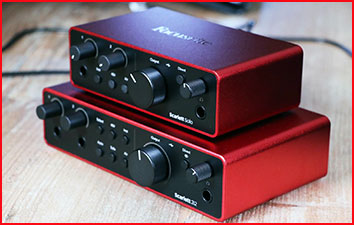
I started with the Scarlett Solo 3rd Gen about 18 months ago when I began recording vocals and acoustic guitar at home. My previous setup was a cheap USB mic that sounded thin and had noticeable noise.
The 3rd Gen was easy to set up—plug in, install the drivers, and I was recording in minutes. The preamp was clean, gain was plentiful, and latency was low enough for comfortable monitoring. I recorded dozens of vocal takes and guitar layers with it, and the results were solid for the price.
After a year, I upgraded to the Scarlett Solo 4th Gen to see if the improvements were worth it. The difference was immediately noticeable. The preamps sound clearer and more open, especially in the high end.
The new Air mode adds a nice presence boost that makes vocals cut through the mix better without sounding harsh. The 4th Gen also feels more refined—the gain knob has a nicer feel, and the instrument input handles my guitar with better detail and less noise.
Side-by-side testing with the same mic and guitar showed the 4th Gen has a wider dynamic range and lower noise floor. Quiet passages are cleaner, and loud parts have more headroom before clipping.
The updated software bundle includes more useful plugins, and the app is more stable. For podcasting and voiceover work, the 4th Gen makes editing easier because the recordings need less noise reduction.
Both interfaces are simple and reliable. The 3rd Gen is still perfectly usable and great for beginners on a budget. The 4th Gen is the better choice if you record regularly and want improved sound quality and modern features.
For me, the upgrade was worth it—my recordings sound more professional with less post-production work. If you’re starting out, the 3rd Gen is a strong entry point. If you can stretch the budget, the 4th Gen feels like a meaningful step up.
Read More: My Experience with Epson 8500 Vs. 8550
Pros Of Scarlett Solo 3rd Gen
- Affordable Entry-Level Performance: Delivers clean preamps and low latency at a budget price. Great starting point for beginners who want reliable recording without spending a lot.
- Simple Plug-And-Play Setup: Easy installation and straightforward controls—ideal for new users who don’t want complicated software or drivers.
- Solid Build Quality: Sturdy metal chassis that feels durable and looks professional on a desk. Holds up well to daily use.
- Reliable Air Mode: The Air mode adds a subtle high-frequency lift that brings vocals and acoustic instruments to life, giving recordings a more open, studio-like quality.
- Solid Build Quality: The metal chassis feels sturdy and durable. I’ve dropped mine more than once and it still works perfectly fine — that says a lot.
- Good Software Bundle: Comes with the Hitmaker Expansion including useful plugins for recording and mixing right out of the box.
- Low Latency Monitoring: Allows comfortable real-time monitoring with headphones—helpful for vocal and instrument recording.
- Compact And Portable: Small footprint makes it easy to take on the go or fit on a small desk setup.
- Reliable For Basic Recording: Performs well for vocals, guitar, and podcasting—clean enough for most home projects.
- Wide Compatibility: Works smoothly with Windows and Mac computers with standard drivers.
Pros Of Scarlett Solo 4th Gen
- Improved Preamp Sound Quality: Clearer, more open sound with better detail in highs and mids. Makes vocals and instruments sound more natural and professional.
- Enhanced Air Mode: Adds a useful presence boost that helps vocals cut through mixes without sounding harsh—noticeable improvement over the 3rd Gen.
- Lower Noise Floor And Better Headroom: Quieter recordings with more dynamic range—less noise in quiet parts and better handling of loud sources.
- Auto Gain Feature: Simply sing or play for ten seconds and the interface sets the perfect input level automatically — this alone saves beginners from ruined takes caused by gain misjudgment.
- Clip Safe Technology: If your signal clips unexpectedly, Clip Safe silently captures a backup recording at a lower gain — you get a clean take even when things go wrong.
- Updated Software And Plugins: Newer Hitmaker Expansion with more modern tools and improved stability in the Focusrite Control app.
- Refined Controls And Build: Smoother gain knob and slightly upgraded feel while keeping the same sturdy metal chassis.
- Even Lower Latency: Improved drivers make real-time monitoring feel more responsive—great for tracking vocals and instruments.
- Better Overall Value For Serious Users: The upgrades make it worth the small price difference for anyone recording regularly.
- Future-Proof Features: Better performance for modern DAWs and higher-resolution projects.
Cons Of Scarlett Solo 3rd Gen
- Older Preamp Technology: Sound is good but not as open or detailed as the 4th Gen—can sound a bit flatter in comparison.
- Basic Air Mode: Less effective presence boost than the newer version—requires more EQ in post-production for some sources.
- Slightly Higher Noise Floor: More noticeable noise in quiet recordings compared to the 4th Gen.
- Older Software Bundle: Hitmaker Expansion is still useful but not as current as the 4th Gen’s updated plugins.
- No Major Design Updates: Controls feel slightly less refined than the newer model.
Cons Of Scarlett Solo 4th Gen
- Higher Price Than 3rd Gen: Costs more, which may not be justified for absolute beginners or very casual users.
- Still No Phantom Power Switch On Front: Requires going to the back or software for some adjustments—minor inconvenience.
- Limited I/O For Growing Setups: Only one mic and one instrument input—may feel limiting if you want to record multiple sources simultaneously.
- App Can Still Have Occasional Glitches: Focusrite Control is improved but not completely bug-free on all systems.
Maintenance Tips For Scarlett Solo 4th Gen
- Keep Drivers Updated: Regularly check for Focusrite driver and firmware updates—improves stability and performance.
- Clean Gain Knobs And Ports Monthly: Wipe with a dry microfiber cloth—prevents dust buildup that can cause crackling.
- Use Quality Cables: Invest in good XLR and instrument cables—poor cables can introduce noise or connection issues.
- Power Cycle When Needed: Unplug USB for 30 seconds if you notice latency or connection problems—often fixes minor glitches.
- Store In Dry, Dust-Free Place: Keep the unit covered when not in use to protect from dust and humidity.
- Avoid Overloading Inputs: Keep gain levels reasonable—prevents clipping and protects the preamps.
- Backup Settings In App: Save your preferred settings in Focusrite Control for quick recall after updates.
- Test With Different DAWs: Make sure it works smoothly with your main recording software—occasional compatibility tweaks may be needed.
Comparison With Other Brands
Versus Audient iD4 MKII:
Audient iD4 offers excellent preamp quality and console-like sound. Scarlett Solo 4th Gen is more affordable with better software integration—Audient wins for pure audio quality; Scarlett for ease of use and value.
Versus Universal Audio Volt 1:
UA Volt 1 has classic analog warmth and built-in effects. Scarlett Solo 4th Gen is simpler and cheaper—UA wins for vintage tone; Scarlett for straightforward plug-and-play recording.
Versus Focusrite Scarlett 2i2:
The 2i2 has two inputs for more flexibility. Solo models are better for single-source recording—2i2 wins for multi-instrument setups; Solo for simplicity and lower cost.
Versus Behringer UMC22:
Behringer is very budget-friendly. Scarlett Solo offers much better build quality and drivers—Behringer wins for price; Scarlett for reliability and sound.
Versus PreSonus AudioBox USB 96:
PreSonus provides solid performance at a low price. Scarlett Solo 4th Gen has better preamps and software—PreSonus wins for affordability; Scarlett for modern features and support.
Also Read: My thoughts on Echo Dot Vs HomePod Mini
Frequently Asked Questions (FAQ)
Yes—the 4th Gen has clearer preamps, better Air mode, lower noise, and improved software. The upgrades are noticeable for most users.
Yes—if you record regularly and want better sound quality. For absolute beginners on a very tight budget, the 3rd Gen is still good.
Older preamp sound, slightly higher noise floor, and less refined controls compared to the 4th Gen.
Yes—excellent for vocals. Clear preamps, low latency, and useful Air mode make it great for home vocal recording.
Conclusion
Both the Scarlett Solo 3rd Gen and 4th Gen are excellent USB audio interfaces that make home recording simple and reliable. The 3rd Gen is a strong budget choice for beginners, while the 4th Gen is the better pick if you want clearer sound, quieter operation, and modern features. Whichever you choose, you’ll get solid performance and easy workflow—your recordings will sound better and your setup will be much simpler.
Recent Posts
● Interactive 5-Zone Interior & Exterior Paint Blueprint Paint Coverage Calculator: Gallons, Primer, Square Footage & Cost Tap any architectural surface zone on the blueprint...
If you want smooth, shiny hair without spending a fortune on a premium styling tool, the Ella Bella hair dryer may be worth considering.In these Ella Bella hair dryer reviews, I’ll look...